
Preview




Description
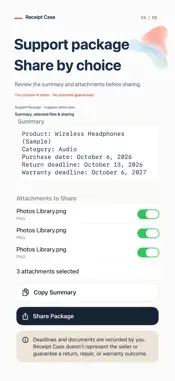
Keep return deadlines, warranty dates and proof of purchase organized by product, so you can find the right documents and explain a problem when you need support. You remember the details when you buy something. Months later, warranty dates slip your mind, invoices sit in your inbox or photo library, and orders are spread across stores. An occasional problem becomes something to check later, until you need to request a return or repair. Receipt Case helps you organize records when you buy, check a product before its deadlines, and prepare documents for support. Keep a useful record for household appliances and everyday electronics. Return and warranty dates on one card Record the return deadline and warranty end date you have confirmed. See days remaining and a separate inspection status for each on the same product card. Watch the return window for new purchases and the warranty for products you’ve had longer. The home screen shows which products still need checking. Reminders that leave time to check With notification permission, the app schedules reminders before the dates you record. Choose one time of day for your reminders. Home Screen and Lock Screen widgets show upcoming deadlines, with product names hidden by default for privacy. Category checklists and specific notes Check products in 18 categories, including phones, computers, photography equipment and appliances. Follow the checklist and add notes to the relevant items when you find a problem. Save a draft to continue later and revisit past inspections when explaining what happened. Product photos, proof of purchase and invoices Keep the three types separate and linked to the product. Take a photo or choose from Photos or Files for each type. For purchase proof and invoices, you can also choose PDF files. Save one attachment per type, along with the purchase date, serial number and notes. Find a product by name or serial number. Documents ready for customer support The Support Package brings together product information, deadlines and inspection details. Copy the summary, or select attachments and share them with the summary using the system share sheet. Organize what you found and the evidence you have before contacting the seller or repair provider. Local records, backups you control No account is required. Product records are stored on your device by default, and saved information can be viewed offline. Archive products you no longer need to track while keeping their records available. Export backups that include original attachments and restore them manually when needed. Keep a copy for your records or use it when you switch devices. Confirm return and warranty dates against the terms of your purchase. Notification delivery and widget updates depend on system permissions, settings and scheduling. For important deadlines, check the dates in the app as well. Your feedback helps us improve Tell us which steps feel cumbersome, what is hard to find or how you would like to use the app. Open Settings > Contact Support to share your suggestions. We listen to feedback, improve features and usability based on everyday needs, and release regular updates.
What's New
Version 2.0 2026-11-21
V2 updates: • Refined Home, forms, and product details, with clearer category selection and adaptive Duo layouts. • Camera entry points for all three attachment...V2 updates: • Refined Home, forms, and product details, with clearer category selection and adaptive Duo layouts. • Camera entry points for all three attachment types and 18 product categories. • Save 3 products free with no time limit. A one-time unlock adds more products and supports purchase restoration. Eligible previous paid customers receive full V2 after verification. • Small and medium Home Screen widgets and a rectangular Lock Screen widget, with product names hidden by default. • Updated interface text across 10 languages. Existing products and information are retained. Reminder delivery and widget updates depend on system settings and scheduling. Technical Analysis
Package Overview Basic metadata
Bundle ID
com.devicedue.app Current Version 2.0
Minimum iOS 17.0
Package Size App Store Size
Package Metadata 0 / 0 version records
Detailed binary, privacy manifest, framework, and Info.plist results have not been indexed for this package yet. The verified App Store and archive metadata above remains available.
Known Version Records
0 version records with stored package metadata
Stored metadata does not guarantee a package is currently available to download.
| Details | Version / IDs | Version date | Action |
|---|