Preview





Description
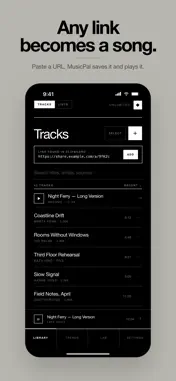
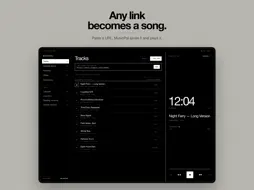
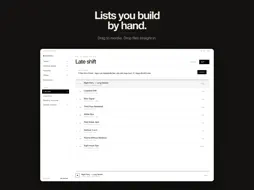
A quiet, ad-free player for the audio you care about. Most music apps want to be a store, a feed and a social network. MusicPal only wants to be a player. Bring your audio in one of two ways — import the files you already own, or paste a link — and the screen holds a title, a running clock and the play key. No video window, no feed, no recommendations. YOUR OWN FILES Import MP3, M4A, WAV and AIFF from the Files app, several at a time; titles and artists are read from the files. Imported files live on the device and play with no connection at all — on a plane, underground — in the background and on the lock screen. OR PASTE A LINK Copy a link, tap + Link, and the track lands in your library. Short links are expanded and tracking parameters stripped before anything is saved. A linked track plays through the source's own web player: nothing is downloaded, so it needs a connection. Both kinds share one library, the same lists and the same search. ONE THING WORTH KNOWING Imported audio plays in the background with no conditions attached. iOS does not let a web page begin playing once the app has left the screen, so with linked tracks the one you are on finishes, the queue waits at the next, and it starts when you open the app again. For a whole session in your pocket, import the files. TEN PLAYER FACES, SEVEN THEMES Now Playing has ten looks — Time, Dial, Wave, Cover, Tape, Spectrum, Marquee, Sundial, Pixel and Vinyl — and seven colour themes, each in light and dark. Try any of them on before you choose. Theme and face follow your iCloud account to your other devices. PRACTICE TOOLS Set the speed from 0.75× to 2×, and loop any stretch with A–B: tap for the start, tap for the end, and it repeats until you stop it. For learning a song, a part, a language or a speech. BUILT TO KEEP PLAYING - Sleep timer, by minutes or "finish this track" - Auto-pause when your headphones come out - Resume exactly where you stopped - Repeat all, repeat one, or stop at the end - A link health check that finds dead sources in one sweep - Offline mode: nothing reaches for the network unless you say so WIDGETS AND CONTROLS Home Screen widgets in small, medium and large, Lock Screen widgets, and Control Center controls for play/pause and adding a link. APPLE WATCH A remote on your wrist: see what is playing, play, pause, skip, or start any list on your iPhone. A complication keeps the track on your watch face. ON IPAD Three columns — lists, library, Now Playing — a full-screen player, and keyboard shortcuts. YOURS ONLY Sort, filter and favourite; one track can sit in as many lists as you like. Trends charts your last 7 days, 30 days or 12 months from records kept on the device. No account, no sign-in, no server. SEVENTEEN LANGUAGES English, 简体中文, 繁體中文, 日本語, 한국어, Deutsch, Français, Español, Italiano, Nederlands, Polski, Português, Русский, ไทย, Türkçe, Bahasa Indonesia, Tiếng Việt. FREE AND PREMIUM Free: ten tracks and one list at a time, links or imported files. Delete something and the room comes back. Premium: unlimited tracks and lists, a whole playlist from one link, batch paste, playback speed and A–B looping, every theme and player face, backup and restore, and every feature added from here on. Subscription or one-time purchase. Subscriptions are charged to your App Store account and renew automatically unless cancelled at least 24 hours before the period ends. Manage or cancel any time in your account settings. Terms of Use: https://elevenapril.com/terms Privacy Policy: https://elevenapril.com/privacy
What's New
Version 1.2 2026-10-18
MusicPal is on your wrist. See what's playing on Apple Watch, then play, pause or skip. Turn the Digital Crown to set your iPhone's volume, or tap any list to s... Technical Analysis
Package Overview Basic metadata
Bundle ID
com.elevenapril.MusicPal Current Version 1.2
Minimum iOS 18.0
Package Size App Store Size
Package Metadata 0 / 0 version records
Detailed binary, privacy manifest, framework, and Info.plist results have not been indexed for this package yet. The verified App Store and archive metadata above remains available.
Developer Information
Known Version Records
0 version records with stored package metadata
Stored metadata does not guarantee a package is currently available to download.
| Details | Version / IDs | Version date | Action |
|---|