
Preview




Description
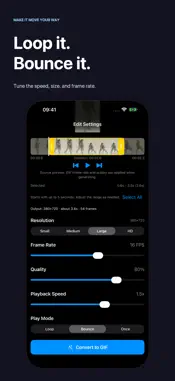
Turn your videos into GIFs — without watermarks. Choose the best moment, make it loop or bounce, and share it from your iPhone or iPad. No accounts, ads, or subscriptions. KEEP THE BEST PART Select a video from Photos, including a screen recording saved there. Preview the original video and trim the start and end before converting. New clips start with up to five seconds selected, so you can begin with a short moment and adjust from there. MAKE IT MOVE YOUR WAY • Choose Loop, back-and-forth Bounce, or Once playback. • Adjust playback speed from 0.5× to 2×. • Choose output resolution from Small to HD. • Set frame rate from 4 to 24 FPS and adjust encoding quality. • Check output dimensions, estimated duration, and frame count before converting. The editor previews your source video with your speed and playback mode. GIF frame rate and encoding quality are applied when you convert. REFINE WITHOUT STARTING OVER Preview the finished GIF and see its file size. Tap Continue Editing to return with your trim range and settings intact. Each new conversion saves another version. For a smaller file, try a shorter clip, lower resolution, or fewer frames per second. KEEP AND SHARE Find your creations in Gifsky's local gallery. Open a GIF to zoom in, check its file size, share it, copy it, save it to Photos, or delete it. MADE ON YOUR DEVICE Gifsky converts videos on your device without uploading them to a server. Gifsky adds no watermark and includes no account, advertising, tracking, or subscription. You choose when to share your media or save it to Photos. Conversion works offline once the selected video is available on your device. Downloading a video from iCloud Photos may require an internet connection. GIF playback depends on the receiving app. Requires iOS or iPadOS 18.5 or later. The app interface is in English. Questions or feedback: [email protected]
What's New
Version 1.2 2026-11-09
Make your GIF, then make it yours. • Return from the finished GIF to editing with your trim range and settings intact. • Start with a short selection and check... Technical Analysis
Package Overview Basic metadata
Bundle ID
com.caperea.gifsky Current Version 1.2
Minimum iOS 18.5
Package Size App Store Size
Package Metadata 0 / 0 version records
Detailed binary, privacy manifest, framework, and Info.plist results have not been indexed for this package yet. The verified App Store and archive metadata above remains available.
Known Version Records
0 version records with stored package metadata
Stored metadata does not guarantee a package is currently available to download.
| Details | Version / IDs | Version date | Action |
|---|