
Preview





Description
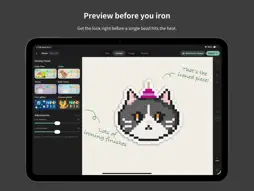
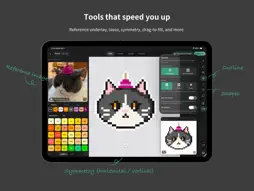
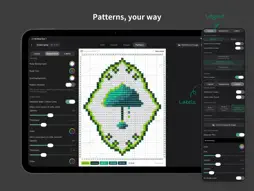
Core Features: Professional Drawing Tools An eraser that removes by color block, a paint bucket with drag-to-fill, one-tap outlining, and line, rectangle, and ellipse tools that make every stroke effortless. The lasso tool lets you cut, copy, paste, select all, or invert a selection — and paste across layers or even across canvases. Vertical, horizontal, and diagonal symmetry axes mean you never have to draw a mirrored pattern twice. Layer Management Full multi-layer drawing with one-tap clear, duplicate, and focus mode for every layer. Handy Gestures Two-finger undo, three-finger redo, and the "Magic Cube" — a floating widget that toggles color codes and replays your creation process. Ironing-Effect Preview Preview six realistic ironing finishes: full melt (no-hole), bath-mitt texture, towel texture, coarse glitter, fine glitter, and linen. One-Tap Pixelization Turn photos and cartoon images into pixel art in a single tap, with your choice of style and target color count. All-in-One Share Image Studio Create social-media-ready images right inside the app — swap backgrounds, add pattern shadows, and more. Fully Customizable Pattern Export Major and minor grid lines, ruler colors, color card styles, signature and text watermarks, mirrored output, and export-by-color — tune everything until it's exactly how you want it. iCloud Cross-Device Creating Your work syncs in real time between iPad and iPhone via iCloud. Built-in Pegboard Import smart PDF patterns, .handpix files, or your in-app projects — then build bead by bead, sorted by color code or split into 5x5、10×10 sections. Who Is It For? - Pattern designers: draw efficiently, preview the finished look, export social covers, and share patterns in multiple formats. - Bead hobbyists: turn your avatar, pet, favorite artwork, or original characters into bead patterns. - Bead and craft shops: design, adjust, and deliver ready-to-build patterns for your customers. Supports Apple Pencil and touch. Long-press anywhere to discover 130+ features! Handpix — the professional pixel artist's choice. Privacy Policy: https://handpix.app/privacy/ Terms of Use (EULA): https://www.apple.com/legal/internet-services/itunes/dev/stdeula/
What's New
Version 1.1.0 2026-10-23
Handpix can now do pixel art! Pixel Art Mode - Choose "Pixel Art" when creating an artwork and use any color you like, free from bead color codes - Pick colors... Technical Analysis
Package Overview Basic metadata
Bundle ID
app.handpix.Handpix Current Version 1.1.0
Minimum iOS 17.0
Package Size App Store Size
Package Metadata 0 / 0 version records
Detailed binary, privacy manifest, framework, and Info.plist results have not been indexed for this package yet. The verified App Store and archive metadata above remains available.
Known Version Records
0 version records with stored package metadata
Stored metadata does not guarantee a package is currently available to download.
| Details | Version / IDs | Version date | Action |
|---|