
Preview



Description
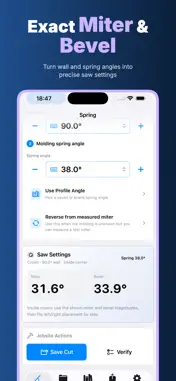
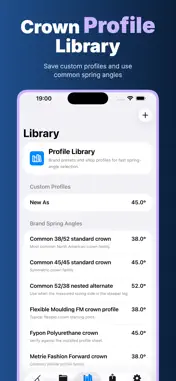
Spring is a focused angle calculator for crown molding, baseboard and casing work. Measure the actual corner, enter the molding’s spring angle, and get the miter and bevel settings you can take to the saw. It is built for trim carpenters, finish carpenters, remodelers, contractors, woodworkers and careful DIYers who need a dependable reference at the jobsite. Privacy and focus by design • Offline — calculate crown and flat-trim settings, save projects and prepare a PDF reference without depending on a live connection. • No Login — start calculating without an account, email address, password or team workspace. • Privacy First — room names, job notes and saved cut details stay under your control. • On Device — the calculator, angle math, project library and PDF creation run on your iPhone. • No Cloud Upload — Spring has no proprietary upload service; data is local-first, while iCloud may sync app data when available if Apple’s system setting allows it. Calculate the cut you actually need Start with the real wall angle rather than assuming every corner is a perfect 90°. Choose inside or outside, enter the wall and molding spring angles, and Spring calculates the compound miter and bevel together. The result explains the turn direction for each corner. When the spring angle is unknown, switch to Reverse and enter a measured test miter. Spring infers the spring angle from the wall angle and measured miter, then returns the corresponding crown settings. This gives you a practical way to work from a sample cut or an installed piece instead of guessing from a label. Flat trim is included for baseboard and casing situations where a bevel setting is not needed. Choose Crown or Base / Casing from the cut-type menu and keep the result matched to the work in front of you. Fast presets cover common 90° inside, 90° outside and 135° bay setups, while direct numeric entry handles unusual walls and real-world corrections. Use familiar molding profiles The profile library includes common 38/52 and 45/45 crown references plus starting points for flexible molding, Fypon, Metrie and Orac Decor profiles. Add your own brand or shop profile with its spring angle and notes. Presets are starting points, so check the profile sheet or measure the molding. Save a jobsite setup Save each cut with a title and place it in a project. Projects hold a room name, notes and multiple saved cuts with the wall, spring, miter, bevel, corner and trim type. Reopen a job, review values, delete an outdated cut or duplicate a project before trying a variation. Set the app to your workflow Choose Imperial or Metric, set angle precision from whole degrees through two decimal places, choose a default corner, and set default wall and spring angles. The app follows supported iOS languages through iOS Settings. Spring Pro subscription Spring requires an active Pro subscription after onboarding. Monthly and yearly plans have a 7-day free trial and auto-renew until canceled. Price appears before purchase. Manage or cancel in App Store settings; restore purchases in the app. Create a printable reference Select a saved project in Export to generate a PDF cut list with the project name, room, saved corners and wall, spring, miter and bevel values. It also creates printable angle cards. Share when you choose. Spring is a calculation and reference tool, not a replacement for measuring the site, checking the actual molding profile or following saw and PPE procedures. Verify the wall angle, spring angle, left/right orientation, saw scale, blade setup and test fit before cutting production stock. Molding profiles, saw conventions and jobsite conditions vary, so use professional judgment for the final cut. Privacy Policy: https://woodcuttool.com/legal/Spring/privacy/ Terms of Use: https://www.apple.com/legal/internet-services/itunes/dev/stdeula/
What's New
Version 1.0.1 2026-09-08
This update focuses on bug fixes and performance improvements for a smoother, more reliable Spring experience. Technical Analysis
Package Overview Basic metadata
Bundle ID
com.daa.bao.Spring Current Version 1.0.1
Minimum iOS 17.6
Package Size App Store Size
Package Metadata 0 / 0 version records
Detailed binary, privacy manifest, framework, and Info.plist results have not been indexed for this package yet. The verified App Store and archive metadata above remains available.
Developer Information
Known Version Records
0 version records with stored package metadata
Stored metadata does not guarantee a package is currently available to download.
| Details | Version / IDs | Version date | Action |
|---|