
Preview



Description
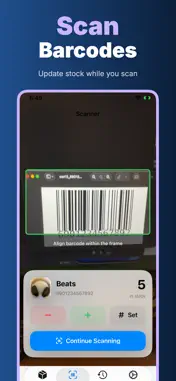
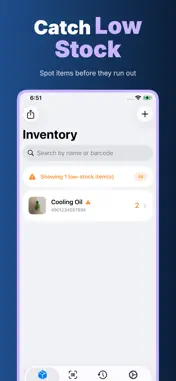
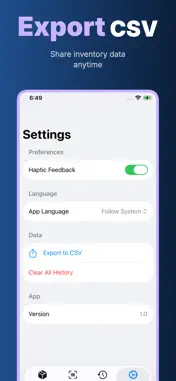
ShelfCount is a simple inventory scanner for people who need to count products quickly without setting up a heavy stock system. Use it for a small shop, home storage, office supplies, market stall, pop-up store, workshop, classroom, sample room, pantry, or any place where you need to know what is on hand. An active subscription is required to use SnapStock. The app is built around five clear promises: Offline, No Login, Privacy First, On Device, No Cloud Upload. You can add items, scan barcodes, adjust quantities, review stock history, and export a CSV file without creating an account. Your product names, barcodes, quantities, notes, photos, low-stock thresholds, and activity records are stored on your iPhone. SnapStock does not run a cloud inventory account for you, does not require sign-in, and does not upload your inventory list to its own server. What you can do with SnapStock: * Scan barcodes with the camera Point the scanner at a product code and SnapStock looks for a match in your local inventory. If the item already exists, you can increase or decrease the quantity right away. If it is new, you can create a product from the scanned code. * Recognize barcodes from photos Use a product photo from the camera or your library, and SnapStock can detect a barcode in the image when one is visible. This is useful when a label is hard to scan live or when you already have product photos saved. * Add products manually Not every item has a barcode. SnapStock supports manual entries and no-barcode items, so you can track handmade goods, loose parts, samples, tools, supplies, materials, boxes, pantry items, and other products that do not come with a retail code. * Track quantity fast Open an item and use clear plus and minus controls to update stock. You can also enter an exact quantity when you need a full count. Each quantity change is recorded, so you can see how stock moved over time. * Use low-stock thresholds Set a low-stock threshold for important items. SnapStock highlights products that are running low, helping you spot what needs a refill before it becomes a problem. * Search by name or barcode Find products quickly with search. Type part of the product name or barcode to narrow a long list, then open the detail view to update the item. * Keep recent activity The history view records scans, product creation, edits, and quantity changes. Product detail pages also show recent activity, so you can understand what changed without guessing. * Add photos and notes Attach a product image and keep notes for size, location, supplier, color, batch, shelf, or anything else that helps you identify the item later. * Export CSV when you choose SnapStock can export your inventory as a CSV file with name, barcode, quantity, low-stock threshold, notes, and creation date. The export uses the iOS share sheet, so you decide whether to save, send, print, or move the file. The app does not silently sync that data to a cloud service. Why privacy matters for inventory Offline: core inventory work can be done without relying on an online service. No Login: there is no required registration before you can manage stock. Privacy First: the workflow is designed around your control of product data. On Device: scanning, barcode recognition, item storage, history, and CSV creation happen on your device. No Cloud Upload: SnapStock does not upload your inventory database to its own cloud. Privacy Policy: https://5gotogo.github.io/SnapStock-privacy/privacy-policy.html Support: https://5gotogo.github.io/SnapStock-privacy/apple-review-support.html
What's New
Version 1.0.2 2026-07-13
Bug fixes and performance improvements. Technical Analysis
Package Overview Basic metadata
Bundle ID
com.daa.bao.SnapStock Current Version 1.0.2
Minimum iOS 17.6
Package Size App Store Size
Package Metadata 0 / 3 version records
Detailed binary, privacy manifest, framework, and Info.plist results have not been indexed for this package yet. The verified App Store and archive metadata above remains available.
Developer Information
Known Version Records
0 version records with stored package metadata • 3 known version records
Stored metadata does not guarantee a package is currently available to download.
| Details | Version / IDs | Version date | Action |
|---|---|---|---|
| Not archived | App Store ID: 888084847 | Unknown | Request Version |
| Not archived | App Store ID: 886335749 | Unknown | Request Version |
| Not archived | App Store ID: 886039656 | Unknown | Request Version |