
Preview






Description
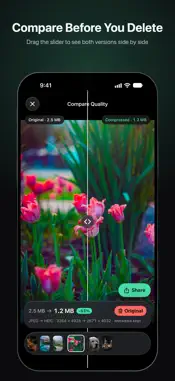
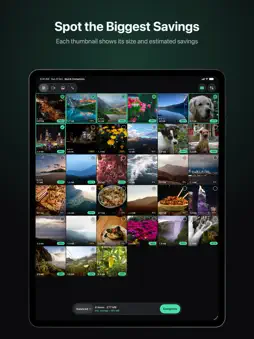
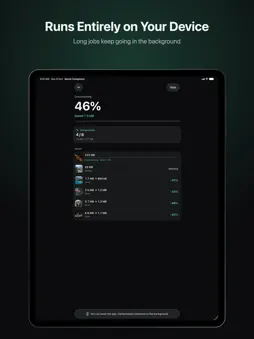
Pick. Tap. Done. QuickCompress shrinks photos and videos to help you reclaim storage space. Everything runs entirely on your device, your original files stay untouched until you decide to delete them, and all your metadata carries over. How it works - Browse your library in a 3-column grid, sorted newest first. Filter by photos or videos, sort by date or file size, and drag across thumbnails to select multiple items quickly. - Every thumbnail displays its current size and an estimated space savings badge, making it easy to identify the largest files right away. - Choose from three compression presets: - Balanced (recommended): 1080p HEVC video and high-quality HEIC photos up to 4032px. - Light: Retains original resolution with moderate compression. - Max: 720p HEVC video and 2048px HEIC photos for maximum space savings. - Savings estimates recalculate across your library as soon as you switch presets. - Share from the results page or the full-screen viewer. If an item isn't compressed yet, QuickCompress offers to compress it first, then opens the share sheet. Your originals stay safe - Compressed files are saved to your photo library as new items. QuickCompress never overwrites your originals in place. - Review results side-by-side with an interactive comparison slider before deciding what to remove. For video, both clips play in sync. - If compressing a photo or video would not make it smaller, QuickCompress skips it automatically. - Deleting originals is always your call. Tapping Delete Originals uses the standard system confirmation dialog, and deleted items go to Recently Deleted. The space comes back once you empty it there. Preserves metadata and Live Photos - Keeps creation dates, locations, favorites, hidden status, and original album assignments intact. - Photos retain EXIF tags, GPS coordinates, orientation, Display P3 color profiles, portrait depth maps, and HDR gain maps. - Videos keep timestamps, location data, frame rates, and HDR formatting (HDR10 and HLG). Audio tracks pass through directly without re-encoding to preserve sound quality. - Live Photos stay Live Photos. Both the photo and paired video are compressed and re-linked. Background tasks and iCloud - Long jobs keep running in the background, so you can lock your screen or switch apps while the queue runs. You get a notification once compression finishes. - For items stored in iCloud, the system downloads the originals before compressing. Failed downloads retry up to three times, and files already downloaded are never re-downloaded. - Unsupported formats: Slow-motion videos, ProRAW photos, and burst shots are skipped automatically with clear status labels. Privacy and pricing - All processing happens on your device. The app's own code makes zero network requests; the only network activity is the system downloading iCloud originals. - No accounts, no sign-ins, no analytics, and no ads. - Completely free with no in-app purchases.
What's New
Version 2.2 2026-10-30
- Share from more places: the results page has a Share button for every compressed photo and video, and the full-screen viewer now has one too. Send to Messages... Technical Analysis
Package Overview Basic metadata
Bundle ID
ai.quicktui.compress Current Version 2.2
Minimum iOS 26.0
Package Size App Store Size
Package Metadata 0 / 0 version records
Detailed binary, privacy manifest, framework, and Info.plist results have not been indexed for this package yet. The verified App Store and archive metadata above remains available.
Known Version Records
0 version records with stored package metadata
Stored metadata does not guarantee a package is currently available to download.
| Details | Version / IDs | Version date | Action |
|---|