Preview
Description
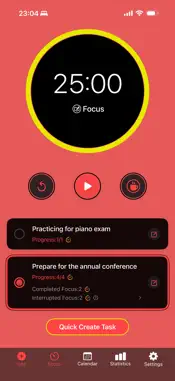
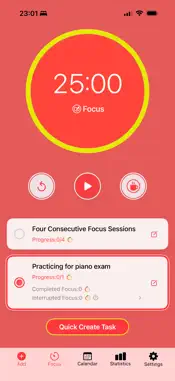
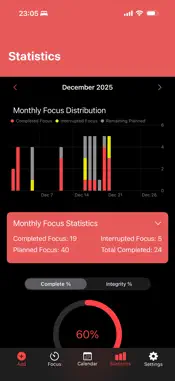
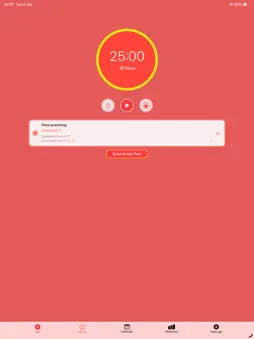
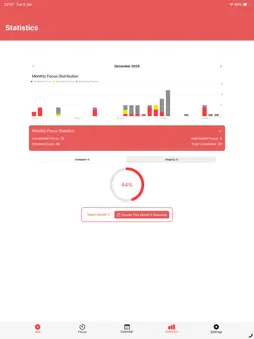
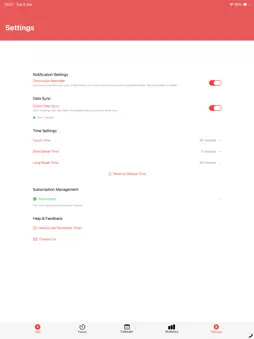
Pomodoro Clock - Simple and Easy Pomodoro Technique App Focused on providing the simplest and easiest Pomodoro Technique experience. One-tap start focus cycles, plan tasks ahead with complex recurring tasks, data analytics help understand focus habits and progress. Key Features 1. Simple and Easy Focus Cycles One-tap start, automatically enters break Automatically enters long break after 4 focus sessions Fully customizable focus and break durations, adapt to personal rhythm Real-time progress display, clear and intuitive Support for pause, reset, and skip operations Beautiful circular progress ring with clear visual feedback Live Activities on lock screen, no need to open the app 2. Smart Task Planning Plan tasks ahead, set target focus counts Assign tasks to specific dates, plan daily goals Support complex recurring tasks: daily, weekly, monthly, yearly, etc. Flexible recurrence configuration: by weekday, date, week number, etc. Real-time task progress tracking: completed, interrupted, planned focus counts Quick task creation, one-tap standard task setup Task editing and deletion (single instance or entire series) 3. Data Analytics to Track Progress Monthly focus statistics for comprehensive insights Completed, interrupted, planned focus counts Focus completion rate and integrity rate analysis Visual charts showing monthly focus distribution Stacked bar charts for daily focus visualization CSV export for further analysis Monthly summary data at a glance 4. Calendar View (Premium Feature) Intuitive calendar interface for daily task overview Date selection to view task details Visual task markers on calendar Long-term planning and schedule management View historical tasks and future plans 5. Multi-Device Sync iCloud-based cloud synchronization Automatic sync of tasks and statistics across all devices Enable/disable sync functionality Data securely stored in your iCloud account Seamless cross-device switching, access anywhere 6. Live Activities & Notifications Live Activities showing real-time timer status View timer progress on lock screen without opening the app Focus/break completion reminder notifications Continuous reminder mode (4 consecutive notifications) Background timer and notification support Control timer directly from Live Activity 7. Personalization Settings Fully customizable focus and break durations Notification preferences (single/continuous reminders) Data sync toggle Dark mode support Clean and beautiful interface design Subscription Service The app offers free basic features and premium subscription services. Subscribers enjoy: Calendar view functionality Data analytics and statistics Complex recurring task configuration Family Sharing support Unlimited access to all features Perfect For Students: Manage study time, improve learning efficiency, plan homework and review schedules Professionals: Enhance work focus, reduce distractions, boost productivity Freelancers: Plan project progress, arrange work time, improve project completion quality Anyone: Build focus habits, stop procrastinating, achieve effective time management Technical Highlights Native iOS app with smooth user experience Supports iOS 18.4 and above Local data storage for privacy protection Dark mode support Clean and beautiful interface design Optimised performance with smooth animations Download Pomodoro Clock now and start your journey to better focus and productivity! Terms of Use: https://www.apple.com/legal/internet-services/itunes/dev/stdeula/
Technical Analysis
Package Overview Basic metadata
Bundle ID
com.Russell-Luo.Pomodoro-Clock.Pomodoro-Clock2 Current Version 1.0
Minimum iOS 18.4
Package Size App Store Size
Package Metadata 0 / 1 version records
Detailed binary, privacy manifest, framework, and Info.plist results have not been indexed for this package yet. The verified App Store and archive metadata above remains available.
Known Version Records
0 version records with stored package metadata • 1 known version records
Stored metadata does not guarantee a package is currently available to download.
| Details | Version / IDs | Version date | Action |
|---|---|---|---|
| Not archived | App Store ID: 875057917 | Unknown | Request Version |