
Preview







Description
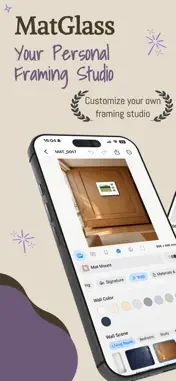
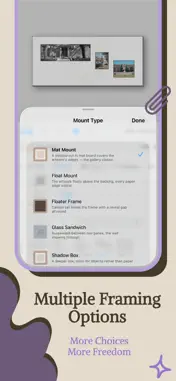
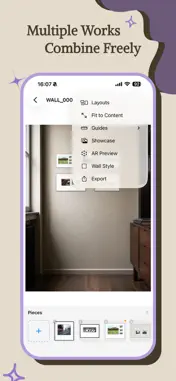
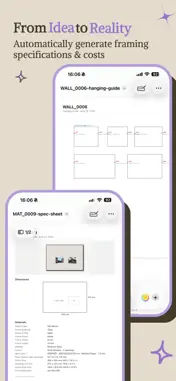
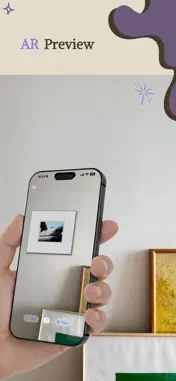
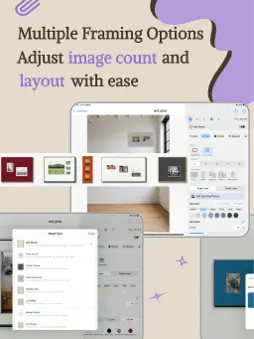
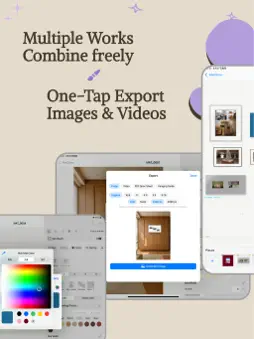
MatGlass is a framing studio for photographers, artists and art lovers. See how your work could look before you print or frame it. Choose a frame, mat and glazing, preview it in a room on iPhone or iPad, then organize your pieces and prepare images or proposals to share. — Rooms — • 358 room scenes across 15 categories, including living rooms, bedrooms, galleries, studies and dining rooms • Preview proportions using your artwork dimensions and each room's calibrated wall scale and lighting • 54 scenes with furniture overlays that can naturally obscure artwork placed behind them • Browse by category, search, save favorites and revisit recently used rooms • Use a photo of your own wall, calibrate its scale and perspective, and save it for future projects (Pro) — Framing — • 30 frame materials and 11 mounting styles, from classic woods and slim metals to float mounts, shadow boxes and hanging scrolls • 42 templates and 26 built-in presets, including modern, classic and photography styles with small prints, generous borders and slim frames • Single, double and triple mats, weighted borders, French mats and layered designs • Adjust frame width and depth, mat borders, textures, cores and bevels in millimetres or inches • Multi-opening mats with 2 to 6 photos, flexible layouts, adjustable spacing and individual photo placement (Pro) • Paper borders, deckle edges and optional signatures (signatures require Pro) — Edit & refine — • Fixed-ratio rectangular cropping, four-corner correction, rotation and straightening, while keeping the original photo • Check estimated print resolution as you change the artwork size • Undo and redo, compare framing or complete room arrangements, and save or share presets • Build colour schemes from your photo, or keep the frame and change only mat colours (Pro) • Estimate materials and costs using your own unit prices (Pro) — Collections & client presentations — • Organize pieces by series or client, with thumbnails and direct photo import • Batch-export several works in one room or one work in several rooms • Save delivery drafts, add pieces, change rooms and create new versions • Create client proposal PDFs with mockups, artwork details and optional quotes (Pro) • Show an overview of all proposals on the cover, with photo thumbnails and dimensions for each mat opening (Pro) — Photo walls (Pro) — • Arrange multiple framed pieces using artwork dimensions and room scale • 14 layout templates plus auto-arrange, grid snapping and alignment guides • Move selections together, align and distribute pieces, and lock their positions • Export mockups, specification sheets and hanging guides — Preview & export — • Live previews with frame depth, shadows and glazing • Showcase camera angles and AR placement in your room (Pro) • Share images or save them to Photos; export at 2400 px, or 4096 px with Pro • Create animated mockup videos, specification PDFs and hanging guides (Pro) — Your library — • Save locally, back up your library and choose which items to restore, including restoring as copies • Recover deleted pieces and photo walls from Recently Deleted for 30 days • Design and organize offline. No account. No tracking. — Languages — English, Simplified Chinese, Traditional Chinese, 日本語, Deutsch, Français, 한국어 and Español. MatGlass Pro is a one-time purchase that unlocks all rooms, premium framing tools, photo walls, custom wall photos, smart colour, cost estimates, Showcase, AR, video, 4096 px export and PDF tools. Start free with 11 rooms, essential framing tools, collections and standard image export.
What's New
Version 3.6 2026-11-13
Bring your artwork together, explore framing options, and prepare presentations for your clients. • Collections: organize pieces by series or client, import ph...Bring your artwork together, explore framing options, and prepare presentations for your clients. • Collections: organize pieces by series or client, import photos directly, and select multiple pieces at once. • Batch Mockups: export several pieces in one room or one piece in several rooms. Save a draft and pick up where you left off. • Client Proposal: create PDFs with mockups, artwork details, and optional quotes. Show all mockups on the cover and include a thumbnail and dimensions for each mat opening. • Crop and Straighten: use rectangular cropping with a fixed aspect ratio or four-corner correction. Custom wall photos now support perspective calibration. • New framing looks: explore 18 new templates with matching presets, including six photography styles that pair small prints with generous borders and slim frames. • Easier recovery: choose which backup items to restore or restore them as copies. Recover accidentally deleted pieces and photo walls from Recently Deleted. • Added Korean and Spanish, plus improvements to scene search, artwork thumbnails, multi-opening editing, and export reliability. Client proposals, custom wall photos, and some framing content require MatGlass Pro. Existing free and Pro access is unchanged. ``` Technical Analysis
Package Overview Basic metadata
Bundle ID
cuicunbin.MatGlass Current Version 3.6
Minimum iOS 18.0
Package Size App Store Size
Package Metadata 1 / 5 version records
Detailed binary, privacy manifest, framework, and Info.plist results have not been indexed for this package yet. The verified App Store and archive metadata above remains available.
Developer Information
Known Version Records
1 version record with stored package metadata • 5 known version records
Stored metadata does not guarantee a package is currently available to download.
| Details | Version / IDs | Version date | Action |
|---|---|---|---|
| 138.9 MB | v3.4 App Store ID: 890058526Build: 3.4 | 2026-09-15 23:21:25 | Get Version |
| Not archived | App Store ID: 889350449 | Unknown | Request Version |
| Not archived | App Store ID: 888189637 | Unknown | Request Version |
| Not archived | App Store ID: 886241851 | Unknown | Request Version |
| Not archived | App Store ID: 884658416 | Unknown | Request Version |