
Preview






Description
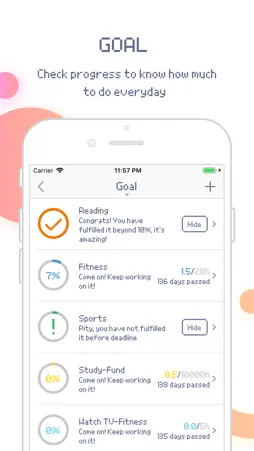
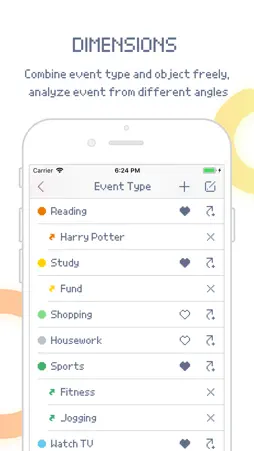
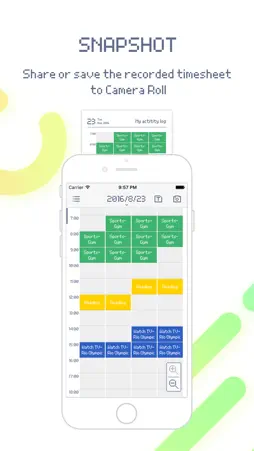
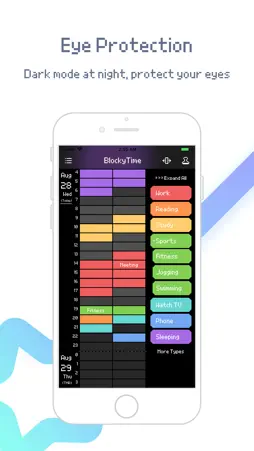
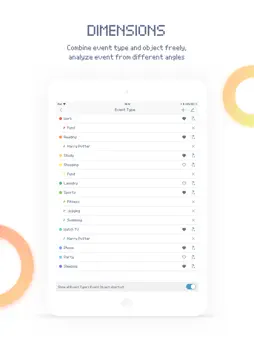
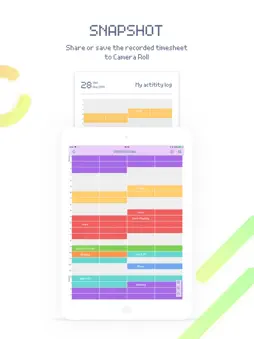
BlockyTime, A simple time logger no need to tap Start/Stop. ### App Store Featured of 2016 in China ### ### Top 10 Productivity apps in China ### Everybody has his own demand on tracking time, but most people can't persist on it for long time because the traditional time-tracking App is way too professional, and it costs too much energy to use a stopwatch. BlockyTime is very different from traditional time-tracking App, it never needs to tap "Start/Stop". Months of research of users experience made us to work out a better tracking method which is more suitable for people's thinking. No worries to forget to start or stop stopwatch, just take a few seconds in leisure time, like playing game, select, tap, a whole day is tracked. When tracking time no longer has pressure but becomes relaxing, it solves the persistence problem easily. Even people don't has huge perseverance can be good at time management. [Features] • Super easy and rapid method to track time spending on every event • Custom classification of event Not only by event type (eg. work, rest), but also by specific details (eg. Game, music), also by priorities (such as four quadrants) • Unique link of event and object, analyze event from different angle • Comment, record details of event like writing a diary • Statistics, analyze time occupation by pie or bar chart • Trend, check and compare events time spending in line chart by day or month • Goal, such as reach 10000h in 5 years on drawing • Backup data to iCloud or computer, never lose it • Selected color themes, and colorblind mode is added [Suitable for] • Students Track time spending on subjects, analyze it and make a better study plan • Researchers Track time spending on research, analyze and make a more efficient research plan • Managers Who have many projects to do and needs to know time spending on every project • People with part-time jobs Track time on every work and analyze earnings • Salespeople Record time and frequency of contacting clients • New moms and dads Get to know baby's regular life and make a plan to rest • People haven't know the value of time Keep tracking time for a while, the statistics will shock you • People want to analyze time and make him better • People want to know what costs time • People are not satisfied with current situation, want to learn how to manage time and improve himself [Q & A] Q: Why named "BlockyTime"? A: Though time is continuous, for rapid tracking, we separate time into blocks by half an hour at the expense of accuracy. This period not only meets the need of statistics, but also is convenient for people to remember event. Q: Why make 30 minutes a block? This is not accurate. A: Statistics is meaningful only when people persist for a long time. Look at statistics in week or month, 30 minutes a blocks hardly make negative effects on analysis. Compared to spending more energy to make it accurate, track time quicker, take advantage of saved time on other things makes it better. Q: I have OCD, inaccuracy makes me uncomfortable. A: Just stand back and think about it, if you pursue the accuracy, after every time of record, should you add an event called "Tracking time"? Then it takes some time to track this one, so you have to record again, and then, endless loop… Never spend much time on tracking time, this is truly using time effectively. [Users' comments] “The most time-saving tool ever” “It makes me not to spend time on recording, reveals the essence of tracking. I must rate this truly efficient app” “One of my favourite time management/tracking apps!” “Very easy to use and intuitive” “Easiest time tracking tool I ever used” “Milestone app of time tracking” -- zhihu.com If you like this app, just take one minute to rate it, we'll appreciate it! [Contact me] Got some ideas in your mind? Let’s get in touch! Say hello to [email protected] Or follow us on: Twitter: @anniApp_com Instagram: @anniApp_com
What's New
Version 1.9.5 2026-04-24
* Fix animation residue on timeline mark or erase + Timeline can be narrowed to enter "Compare Mode" + Settings page contents are searchable + Multi-select: lon... Technical Analysis
Package Overview Basic metadata
Bundle ID
com.anniapp.Timeblocks Current Version 1.9.5
Minimum iOS 11.0
Package Size App Store Size
Package Metadata 1 / 54 version records
Detailed binary, privacy manifest, framework, and Info.plist results have not been indexed for this package yet. The verified App Store and archive metadata above remains available.
Price History (USA store)
3 recorded price change points. These are historical observations, not a guarantee of the current price.
| Recorded at | Price | Currency |
|---|---|---|
| 3.99 | USD | |
| 60.0 | USD | |
| 3.99 | USD |
Known Version Records
1 version record with stored package metadata • 54 known version records
Stored metadata does not guarantee a package is currently available to download.
| Details | Version / IDs | Version date | Action |
|---|---|---|---|
| Not archived | App Store ID: 821581313 | Unknown | Paid / Arcade |
| Not archived | App Store ID: 820901664 | Unknown | Paid / Arcade |
| Not archived | App Store ID: 819990403 | Unknown | Paid / Arcade |
| Not archived | App Store ID: 819294983 | Unknown | Paid / Arcade |
| Not archived | App Store ID: 819140601 | Unknown | Paid / Arcade |
| Not archived | App Store ID: 818946806 | Unknown | Paid / Arcade |
| Not archived | App Store ID: 818723444 | Unknown | Paid / Arcade |
| Not archived | App Store ID: 818287859 | Unknown | Paid / Arcade |
| Not archived | App Store ID: 818115637 | Unknown | Paid / Arcade |
| Not archived | App Store ID: 818033585 | Unknown | Paid / Arcade |
| Not archived | App Store ID: 817728623 | Unknown | Paid / Arcade |
| Not archived | App Store ID: 817586568 | Unknown | Paid / Arcade |
| Not archived | App Store ID: 817090211 | Unknown | Paid / Arcade |
| Not archived | App Store ID: 816524318 | Unknown | Paid / Arcade |