
Preview





Description
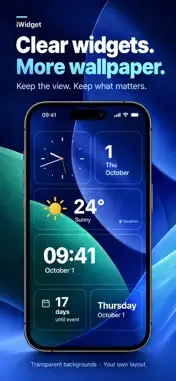
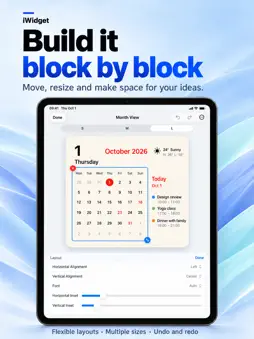
Your Home Screen. Your ideas. iWidget is a DIY studio for your wallpaper. Choose content, arrange blocks, and style every detail. Start from a set. Make it yours. DIY THE CONTENT Build beyond a fixed card. Separate time, dates, weather, photos, text, countdowns, and app launchers into blocks. Move, resize, or remove blocks. Build a photo layout or a daily board. No coding required. 70 ADDABLE BLOCK TYPES. ROOM FOR YOUR IDEAS. Combine calendars, week strips, digital and analog clocks, year progress, lunar dates, solar terms, festivals, moon phases, and seasonal details. Add Apple Weather, hourly and daily forecasts, rain, wind, and sunrise or sunset. Weather symbols, temperatures, conditions, and high/low readings can be arranged separately. Add your own words, greetings, photos, symbols, dividers, and countdowns. Battery, storage, memory, processor, thermal state, network, connectivity, music, and step blocks bring useful information into the same composition. Data varies by device and permissions. A REAL DIY EDITOR Work on a fine grid. Select several blocks, align them, copy their appearance, or overlap them using layers. Hide a block without deleting it. Adjust type, spacing, transparency, corners, borders, and shadows. Undo, redo, and create separate arrangements for different sizes. 72 DESIGN SETS TO GET YOU STARTED Follow customization highlights to edit the relevant block. Save copies for different wallpapers. Keep originals and your own versions separately. Or start from an empty canvas. MADE TO BELONG TO YOUR WALLPAPER Use a clear, solid, or gradient background, with separate light and dark appearances. Check text contrast. Import a Home Screen screenshot to preview slot alignment. Screenshots affect in-app previews, not the real system wallpaper. Transparency depends on system support. PHOTOS WITH PERSONALITY Crop, rotate, fit, or fill. Try circles, hearts, stars, and more masks. Adjust opacity and scale. Turn transparent images into stickers with optional overflow and shadows. APP SHORTCUTS, YOUR WAY Add app launch blocks to your design. Arrange icons in a row, around a ring, or freely alongside dates, weather, and photos. Customize their appearance and tap to launch an app. Opening depends on the app, link, and system. KEEP YOUR WORK. SHARE YOUR IDEAS. Share an .iwidget file or an offline QR code, preview imports, and copy blocks between designs. Choose the saved design for each widget. New work never silently replaces it. INFORMATION WITH PERSONALITY Bring lunar dates, festivals, solar terms, and almanac into a modern composition. Choose Simplified Chinese, Traditional Chinese, or English. App language can differ from the system language. Customize Today with dates, weather, upcoming items, and countdowns. Optional iCloud sync keeps your designs on your own devices. PRIVATE, WITHOUT THE CLUTTER No account or ads. Designs stay on your device unless you enable private iCloud sync. Location is optional: choose a city manually. Health access is optional and read-only. Lock Screen and Control Center features vary by system. FREE EXPERIENCE AND MEMBERSHIP Download free. Try all editing tools for 7 days from first use. No automatic charge. Then choose monthly or annual membership, or a one-time lifetime purchase. All plans share the editor. Browse, add, import, and open saved designs free. Editing needs the free experience or membership. When that ends, Home Screen, Lock Screen, and Quick Launch show a lock; tap opens membership. Apple supplies prices. Apple may charge within 24 hours before renewal. Buying during the free experience charges immediately. Cancel renewal in Apple subscription management; paid access lasts through its valid period. Lifetime does not cancel an existing subscription. Restore purchases in the app. Tips unlock nothing. No Family Sharing. Requires iOS or iPadOS 17 or later. Terms: https://ihtcstudio.github.io/iWidget/terms/ Privacy: https://ihtcstudio.github.io/iWidget/privacy/
What's New
Version 1.4.0 2026-11-03
iWidget v1.4.0 is here Turn weather into charts, motion into stories, and wallpaper into frosted glass. This release adds new data blocks, richer backgrounds, ... Technical Analysis
Package Overview Basic metadata
Bundle ID
com.iHTCboy.iWidget Current Version 1.4.0
Minimum iOS 17.0
Package Size App Store Size
Package Metadata 0 / 0 version records
Detailed binary, privacy manifest, framework, and Info.plist results have not been indexed for this package yet. The verified App Store and archive metadata above remains available.
Known Version Records
0 version records with stored package metadata
Stored metadata does not guarantee a package is currently available to download.
| Details | Version / IDs | Version date | Action |
|---|