
Preview






Description
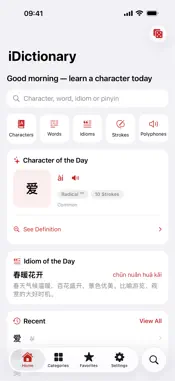
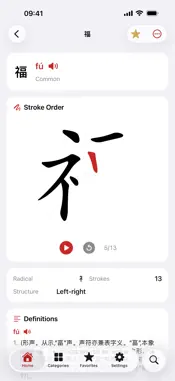
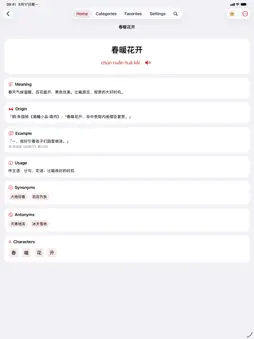
iDictionary is a fully offline Chinese character learning dictionary with more than 21,000 characters, over 320,000 words, and nearly 50,000 idioms. After first-launch unpack, it works without a network. It brings learning into Home Screen, Lock Screen, Control Center, and Siri, with no account required. 1. Large offline lexicon A complete local database of characters, words, and idioms uses SQLite and full-text search. It unpacks on first launch, then runs fully offline. Core lookup stays on device. 2. Unified search Search characters, words, idioms, and pinyin together, with results grouped by type. Traditional input matches the simplified lexicon. Keep recent queries for review. 3. Character details Each character includes pinyin, radical, stroke count, structure, traditional forms, and variants. Definitions are grouped by reading, with examples and citations. Long-press to copy, translate, speak, or open related items. 4. Share cards Create share images or text for characters, words, and idioms. Save to Photos or share through the system sheet. 5. Stroke-order animation More than 9,500 characters offer stroke-by-stroke animation. Adjust speed and replay to learn correct order and writing habits. 6. Words and idioms Word pages include pinyin, definitions, and character-by-character breakdowns. Idiom pages include definition, origin, examples, usage notes, and near or opposite idioms. 7. Category browsing Browse by radical, stroke count, and frequency. Explore polyphones, index idioms and words by pinyin initial, and open a word browser. Switch among list, grid, and card layouts. 8. Handwriting and camera lookup Handwrite when you do not know the pinyin; recognition can run after you pause and show candidates. Camera scan reads text in a photo and jumps to lookup on supported devices. 9. Daily learning Home shows a Daily Character and Daily Idiom that stay stable for the local day and refresh each day. Flip the Daily Character card to reveal the definition. 10. Favorites and history Favorite characters, words, and idioms; filter by type; pin important items. Recent queries are saved in Settings. Optional iCloud sync is off by default. 11. Mandarin speech System speech speaks characters and words. Toggle auto-speak and adjust rate to link listening with reading. 12. Widgets and Live Activities Daily Character, Daily Idiom, and learning overview widgets support Home Screen and Lock Screen styles. Widgets can follow your accent color. Live Activities can show today progress. 13. Control Center and Home Screen quick actions On iOS 18 and later, add a random-study control to Control Center. Long-press the app icon to customize up to four quick actions, including search, Daily Character, handwriting, camera lookup. 14. Siri and Shortcuts App Intents cover lookup, Daily Character, random study, and opening search. 15. Spotlight Characters are indexed for Spotlight, so system search can open a detail page directly. 16. Interface and personalization Choose light, dark, or system appearance. Interface language supports Simplified Chinese, Traditional Chinese, and English. Pick accent colors or a custom accent; on iOS you can also change the app icon. Customize tabs, recent history, stroke speed, and whether widgets follow your theme. 17. Multiplatform Works on iPhone, iPad, Mac, and Apple Vision Pro with one download. 18. Privacy first No ads and no tracking. Lookup and learning data stay on device; iCloud sync is optional. In-app credits list sources. If Mail is not set up, an in-app feedback page still helps you reach the developer. iDictionary fits students, teachers, writers, overseas learners, and character lovers. Keep a Chinese lexicon in your pocket to look up, learn, and review anytime. Definitions and stroke data are for learning reference. Suggestions and corrections are welcome through in-app feedback. Start with today character, and rediscover the beauty of the Chinese language, one entry at a time.
What's New
Version 1.6.0 2026-10-02
iDictionary v1.6.0 is here — a major update that puts daily learning on your Home Screen, Lock Screen, and Control Center. 1. New Random Pick widget for Home a... Technical Analysis
Package Overview Basic metadata
Bundle ID
com.iHTCboy.iDictionary Current Version 1.6.0
Minimum iOS 17.0
Package Size App Store Size
Package Metadata 0 / 0 version records
Detailed binary, privacy manifest, framework, and Info.plist results have not been indexed for this package yet. The verified App Store and archive metadata above remains available.
Known Version Records
0 version records with stored package metadata
Stored metadata does not guarantee a package is currently available to download.
| Details | Version / IDs | Version date | Action |
|---|