
Preview




Description
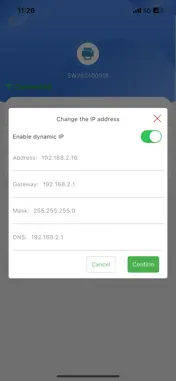
The Print Assistant App is a dedicated tool application designed to configure network parameters of printing devices via Bluetooth connection. Print Assistant delivers a streamlined mobile solution that enables users to securely pair their mobile device with Bluetooth-enabled printers. Through this encrypted Bluetooth link, users can directly transmit target Wi-Fi credentials (SSID and password) and configure essential network parameters—including IP address (static or dynamic assignment), subnet mask, gateway, and DNS—without requiring pre-existing network access or computer assistance. This significantly simplifies initial device setup and network integration. Core Features: • Bluetooth Device Discovery and Pairing: Rapidly detect and establish a secure, encrypted connection with compatible nearby printing devices. • Guided Network Configuration: Intuitive step-by-step workflow for entering Wi-Fi credentials and setting network parameters. • Configuration Status Feedback: Real-time confirmation of parameter transmission, device connection status, and optional generation of configuration summary reports. • Truly Offline Operation: Functions entirely via Bluetooth, ideal for environments with no Wi-Fi, on-site installations, or batch deployment scenarios. Target Users: • Home Users: Quickly onboard new printers to home Wi-Fi networks. • Enterprise IT Personnel: Efficiently configure multiple printing devices across office environments. • Field Technicians: Perform initial setup and network provisioning in offline or restricted-access locations. • Small and Micro Business Operators: Reduce technical barriers and accelerate deployment workflows. Print Assistant transforms complex network configuration into a secure, user-friendly Bluetooth-driven process, enabling reliable device connectivity preparation in minutes while enhancing deployment efficiency and operational confidence.
Technical Analysis
Package Overview Basic metadata
Bundle ID
com.net.printAssistant Current Version 1.0
Minimum iOS 12.0
Package Size App Store Size
Package Metadata 0 / 1 version records
Detailed binary, privacy manifest, framework, and Info.plist results have not been indexed for this package yet. The verified App Store and archive metadata above remains available.
Known Version Records
0 version records with stored package metadata • 1 known version records
Stored metadata does not guarantee a package is currently available to download.
| Details | Version / IDs | Version date | Action |
|---|---|---|---|
| Not archived | App Store ID: 874204701 | Unknown | Request Version |