
Preview






Description
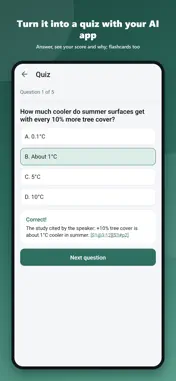
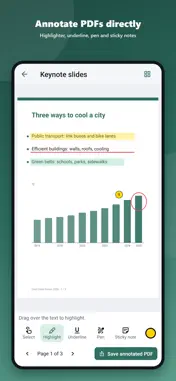
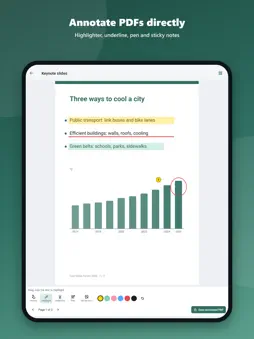
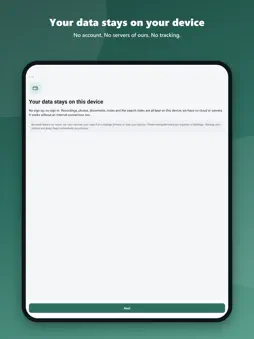
PinweKnow turns recordings into notes you can search and study. Record a class or meeting; it is transcribed on your device. Your own AI app turns it into notes, a summary, flashcards or a quiz, saved back to the session. Handouts, PDFs, web pages and your notes sit in the same session, and every passage leads back to its source: that second of the recording, that page of the PDF. NO ACCOUNT, YOUR DATA ON YOUR DEVICE • No sign-up and no server of ours. The app collects no data, shows no ads and does not track you • Everything you capture stays on this device • Works offline; it goes online only when you tap "Fetch page text", and only to that website • Password-encrypted backups, saved where you choose SIX WAYS TO CAPTURE • Scan paper, slides or a whiteboard, several pages at once • Record while adding time-stamped notes, marks and photos • Record video; its audio is transcribed too • Import PDFs, photos, audio, video, text files, and SRT or VTT transcripts • Paste a link or some text, or fetch a web page's text • Write notes; mark them as key points or keep them private TRANSCRIBED ON YOUR DEVICE • Recordings and imported audio or video are transcribed on the device, without uploading • Tap a line to jump to that second • Uses iOS speech recognition (iOS 26 or later, iPhone 12 or newer; iOS downloads each language once) ASK AI, IN YOUR OWN AI APP • PinweKnow runs no AI itself; content goes to the AI app you choose, not to a server of ours • Pick a task (summary and key points, meeting minutes, study notes, flashcards, quiz, mind map, to-do list, translate) or write your own. PinweKnow opens your AI app with the instruction and the full record copied: paste and send • Copy the answer and tap "Paste reply" in PinweKnow: it becomes a searchable AI result in the full record • Source codes in the answer are checked against what you sent; unmatched ones are marked "Unverified" • Email addresses, phone, ID and card numbers are hidden before sending by default; private notes stay out • On iOS 26 or later, you can also translate on the device FLASHCARDS, QUIZZES, MIND MAPS, TO-DOS • Once your AI app writes them, flip flashcards, take the quiz with a score and explanations, expand the mind-map outline, tick off to-dos • Source codes on cards, explanations and to-dos lead back to that second or page FETCH PAGE TEXT • Paste a web address and tap "Fetch page text": that page's text is saved as a link material with searchable paragraphs FIND IT, GO BACK TO IT • Text in photos and scans is recognized on the device (OCR); PDF text is extracted automatically • One search box covers notes, transcripts, PDFs, recognized text, web pages and AI results; a result opens that second or page • Notes can point to a time or page; if the material is deleted, the note stays and shows "Source deleted" ONE FULL RECORD • Transcripts, text from photos, scans and PDFs, notes and AI results in time order (reading sessions follow your order) • Each passage starts with a source code (time or PDF page); tap it to go back • Export as PDF or Markdown, print or copy; private notes stay out unless you include them • Read aloud with your device's voices: transcripts, documents, AI results, the full record; choose voice and speed PDF ANNOTATIONS AND PAGE TOOLS • Highlighter, underline, pen and sticky notes • Rotate, reorder, delete, extract and crop pages, merge files, or turn a scan into a PDF • Save PDF or scan pages as JPG images • Annotations are kept separately or saved as a new PDF; the original never changes ORGANIZE YOUR WAY • Topics and subtopics, projects, tags and contexts; long-press to categorize several sessions at once • Two-column layout on iPad • English, Traditional Chinese, Simplified Chinese, Japanese and Korean Before recording or filming, follow local laws and venue or meeting rules, and respect other participants' wishes. Privacy Policy: https://pinwelife.com/privacy/
What's New
Version 1.0.1 2026-11-19
• New name: PinweKnow: Study & Work Notes • Video: record with the camera; its audio is transcribed too • Ask AI has four new tasks: Flashcards, Quiz, Mind map ...• New name: PinweKnow: Study & Work Notes • Video: record with the camera; its audio is transcribed too • Ask AI has four new tasks: Flashcards, Quiz, Mind map and To-do list. Your AI app writes them; back in PinweKnow, flip the cards, take the quiz with a score and explanations, expand the outline and tick off to-dos • Fetch page text: paste a web address to save that page's text as a searchable link material • Read aloud: your device's voices read transcripts, documents and AI results • Crop pages; save PDF or scan pages as JPG images • Simpler screens: less-used actions are under More • Bug fixes Technical Analysis
Package Overview Basic metadata
Bundle ID
com.pinwelife.pinweknow Current Version 1.0.1
Minimum iOS 16.4
Package Size App Store Size
Package Metadata 0 / 0 version records
Detailed binary, privacy manifest, framework, and Info.plist results have not been indexed for this package yet. The verified App Store and archive metadata above remains available.
Known Version Records
0 version records with stored package metadata
Stored metadata does not guarantee a package is currently available to download.
| Details | Version / IDs | Version date | Action |
|---|