
Preview


Description
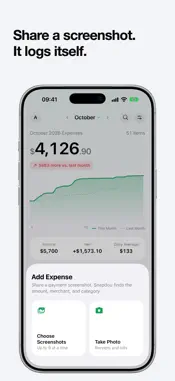
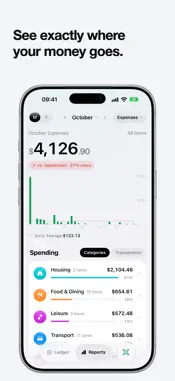
Snapdou is a personal expense tracker that logs spending from your payment screenshots. Share a screenshot and the amount, merchant, date and category are read for you, so you never type entries one by one. SCREENSHOTS BECOME ENTRIES • Pick up to 9 payment screenshots at once, or take a photo of a receipt • Works with Apple Pay, bank apps, PayPal and paper receipts • Shortcuts: press the Action button or back-tap your iPhone to capture a screenshot and send it to Snapdou • Private by design: addresses, phone numbers and names are blacked out on your iPhone before a screenshot is uploaded • Payment method and card are recognized too, so you can filter the ledger by card • Got something wrong? Tap the entry and fix it • The same payment captured twice is logged once; possible duplicates, refunds and failed scans wait in the inbox for a quick look ANY CURRENCY • Pick your home currency: USD, EUR, GBP, JPY, CAD, AUD, SGD, HKD, KRW or CNY • Spending abroad is converted automatically and the original amount is kept • Change your home currency any time and your whole ledger converts at today's rates SEE WHERE THE MONEY WENT • Ledger: this month's running total against last month, so you see at a glance whether you're spending faster • Entries grouped by day, with search and filters by date range and card; swipe to delete or mark as refunded • Reports: monthly or yearly, a bar for every day, and rankings by category or single purchase; tap any number to see the entries behind it • Net worth over time • Trips: create a trip and the spending in those days is collected for you ALSO • Custom categories • Export to CSV or JSON any time • Home Screen widget with this month's spending • Light and dark appearance • Sign in with Apple, no phone number or password; delete your account and all cloud data from inside the app at any time SNAPDOU PRO (OPTIONAL) No ads. Every AI scan costs us money, so the free plan includes 30 scans a month. Snapdou Pro makes scanning unlimited. The ledger, reports, net worth, export and widget are free. • Snapdou Pro Yearly: auto-renewing yearly subscription, with a 7-day free trial for first-time subscribers • Snapdou Pro Lifetime: one-time purchase, never renews Prices are shown in the app and on the purchase sheet in your local currency. Payment is charged to your Apple Account. The subscription renews automatically unless turned off at least 24 hours before the end of the current period; manage or cancel it in your Apple Account settings. Cancel during the trial and you are not charged. Privacy policy: https://max1874.com/avocado/privacy Terms of use: https://www.apple.com/legal/internet-services/itunes/dev/stdeula/
What's New
Version 1.1.4 2026-11-16
• Me › Shortcuts now shows how to set up the Action button as well as Back Tap: add Screenshot Expense, then press the Action button to log what's on screen • T...• Me › Shortcuts now shows how to set up the Action button as well as Back Tap: add Screenshot Expense, then press the Action button to log what's on screen • The automatic "Scan Receipt" shortcut is gone because it couldn't take a screenshot. To capture and log in one step, add Screenshot Expense from Me › Shortcuts • Search results from earlier years now show the year in their dates Technical Analysis
Package Overview Basic metadata
Bundle ID
com.linyouxiang.Avocado Current Version 1.1.4
Minimum iOS 17.0
Package Size App Store Size
Package Metadata 0 / 0 version records
Detailed binary, privacy manifest, framework, and Info.plist results have not been indexed for this package yet. The verified App Store and archive metadata above remains available.
Known Version Records
0 version records with stored package metadata
Stored metadata does not guarantee a package is currently available to download.
| Details | Version / IDs | Version date | Action |
|---|