Preview


Description
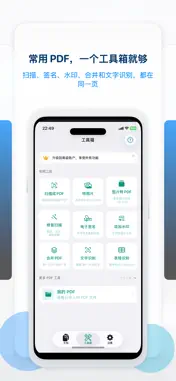
Need a clean PDF from a receipt, contract, form, or passport page, and there is no desktop scanner nearby. Doc Copy captures the page, crops the edges, and exports a file you can sign, search, and share from your iPhone or iPad. WHAT DOC COPY DOES Photograph a document and turn it into a PDF in one flow Auto edge detection crops the page and straightens the shot Repair a weak scan by reducing shadows and correcting perspective Sign, merge, watermark, compress, and password protect without a computer Read the page with on device OCR and copy the text Swap an ID photo background and save a print size preset No ads and no account. Open the app and start SCAN TO PDF Capture one page, or keep shooting and build a multi page PDF Import photos from your library and combine them into one document Check the crop, rotate pages, and change the order before you export Save to Files, send by email, or keep a local copy for later Add a home screen widget when you want to jump back into a scan PDF TOOLS FOR REAL PAPERWORK Merge several PDFs into one file Extract only the pages you need Rotate, delete, and reorder pages Add page numbers Compress a large file so it is easier to email Place a handwritten signature Add a text or image watermark Encrypt a PDF with a password Remove a password from a PDF you are allowed to open Export pages as JPG or PNG images Stitch pages into one long image Resize a photo when a form asks for a specific size TEXT YOU CAN USE OCR runs on your device and pulls text off a scanned page Rebuild a scan as a searchable PDF so you can find and copy words later Send a recognized table to CSV or Excel Export recognized text as a file that opens in Word ID PHOTO Change the background to white, blue, red, gray, or cyan Pick a common print size, including a passport preset Save the finished photo to your library PRIVATE BY DESIGN Scanning, cropping, OCR, and PDF edits run on your device. Doc Copy does not upload your documents to our servers. Your library stays on the phone or tablet, with folders, favorites, and search Lock the app with Face ID or Touch ID when the paperwork is sensitive ONE PURCHASE, NOT A SUBSCRIPTION Pro is a single unlock. It opens the full PDF toolkit and ID photo tools, and it removes the camera to PDF page limit. The price is shown on the App Store before you pay. Restore the purchase on a new device with the same Apple ID. BEFORE YOU SEND A FILE Doc Copy helps you make personal copies and packets to share. A landlord, bank, school, clinic, or government office may require a specific size or format. Confirm their rules before you submit. ID photo presets are print sizes, not a promise that any agency will accept the photo. Download Doc Copy and turn the page in front of you into a PDF you can sign, search, and send.
What's New
Version 1.2 2026-10-07
bug fix Technical Analysis
Package Overview Basic metadata
Bundle ID
com.nickgao.fuyinen Current Version 1.2
Minimum iOS 17.6
Package Size App Store Size
Package Metadata 0 / 0 version records
Detailed binary, privacy manifest, framework, and Info.plist results have not been indexed for this package yet. The verified App Store and archive metadata above remains available.
Known Version Records
0 version records with stored package metadata
Stored metadata does not guarantee a package is currently available to download.
| Details | Version / IDs | Version date | Action |
|---|