Preview




Description
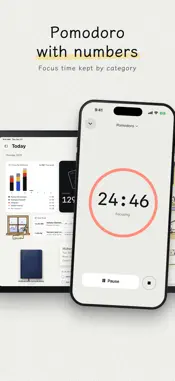
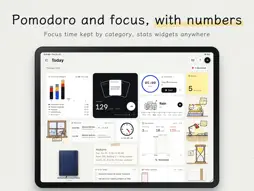
Write it down. Keep it in mind. Memo Clock keeps everything you need to remember in one place. Notes, files, word books, flashcards and the Logbook are the Memo; the Pomodoro, focus time and your daily numbers are the Clock. Frame what to learn into a card and it comes back on the memory curve; your focus and progress sit on a home page you build yourself. Pay once: no in-app purchases, no subscription, no ads, no account. ONE LOOP: WRITE, LEARN, FOCUS, SEE YOUR PROGRESS • Write: handwritten notes, files, photos, typing or the Logbook. • Learn: frame it into a card, learn words one by one, review when it is due. • Focus: the Pomodoro and the focus timer keep your time by category. • See: what you learned, how long you focused and your streak, on your home page. NOTES: FRAME IT, AND IT IS A CARD • Write with Apple Pencil on iPad on grid, lined, dotted, blank, Cornell or graph paper. • Only Apple Pencil writes: a hand resting on the screen draws nothing and breaks no stroke. • Tap Make Card and frame what to learn. The card remembers the page it came from. • Text in handwriting and photos is recognized on your device and found by search. FILES OPEN TO READ • PDF, Word, PowerPoint and web pages: scroll, or turn page by page; slides stop one by one or run on as one strip. • Make cards while you read, the file on the left and the card on the right. Tap Edit to write on a page. LOGBOOK: ONE CELL AT A TIME • Large cells, an aside on the left and the content on the right, in Body, Example, Aside and Red, with photos. • Hold and drag to reorder; swipe to turn pages, and on past the last for a new one. PHOTO TO CARDS AND COVERED CARDS • Select text right on a photo of a textbook for the question or the answer; frame a formula. • Cover part of an answer and it is a card: tap to uncover. WORD BOOKS • CET-4, CET-6, IELTS and Academic English come with the app, with meanings, examples and translations; make your own too. • A word you forget comes back a few words later until you know it; Know passes one you know; Undo any answer. Test asks only Know or Don't Know. FLASHCARDS • Turn the card and grade it Forgot, Fuzzy, Got it or Easy; each grade tells you when it comes back, further apart as you know it better. • Write It Out, Self-Test, or review one deck. Formulas are typeset as math, even as you type. THE CLOCK • Pomodoro and focus timer, by category and in full screen; white noise on a radio, record player, cassette or music box. • More than twenty kinds of statistics: heat map, check-in calendar, accuracy, focus time and more. TODAY AND THE DESK • Build your study home page from dozens of widgets: drag to move, drag a corner to resize, change the paper. Pin decks, notebooks, word books and logbooks to it. • On the Desk, Line Up sets everything in a grid you arrange by holding and dragging; on iPad, Free lets you put things anywhere. HOME SCREEN WIDGETS • Next Card asks the card due first; A Line keeps a line you wrote in sight; Photo to cards, Today's Reviews, Focus and more. IPAD AND IPHONE • Write and read on iPad, review on iPhone; everything syncs through your own iCloud. • Import Anki decks (.apkg) with your review history; share cards with classmates as a file. PRIVACY No account, no server, no analytics, no ads. Your content stays on your devices and in your own iCloud. Simplified Chinese and English. Requires iPadOS 17 / iOS 17 or later; handwriting needs Apple Pencil on iPad.
What's New
Version 2.3.0 2026-10-29
New in 2.3: • Logbook: a few large cells to a page, an aside on the left and the content on the right, in Body, Example, Aside and Red, with photos in cells. Sw... Technical Analysis
Package Overview Basic metadata
Bundle ID
com.yuanhe.memoclock Current Version 2.3.0
Minimum iOS 17.0
Package Size App Store Size
Package Metadata 0 / 0 version records
Detailed binary, privacy manifest, framework, and Info.plist results have not been indexed for this package yet. The verified App Store and archive metadata above remains available.
Developer Information
Known Version Records
0 version records with stored package metadata
Stored metadata does not guarantee a package is currently available to download.
| Details | Version / IDs | Version date | Action |
|---|