Preview




Description
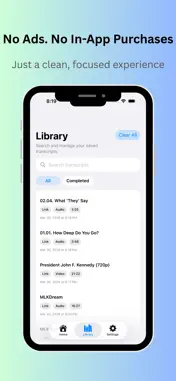
A private, simple transcription app with no sign-up, no uploads, and no distractions. Turn audio and video into text in a faster, simpler way. Video Transcriber helps you extract text from audio and video files so you can review, edit, save, and share your content more easily. Whether you are working with interviews, lectures, meetings, voice notes, online videos, or personal recordings, Video Transcriber gives you a clean and convenient way to turn spoken content into readable text. Designed for speed and simplicity, the app makes transcription easier for students, creators, professionals, researchers, and everyday users who need words from media files without a complicated workflow. Key Features ◉ Transcribe audio and video into text Import media files and convert spoken content into readable text for review and reuse. ◉ Support both audio and video sources Work with common media content in one place instead of switching between multiple tools. ◉ Review results in a clean, focused interface See your transcription results clearly and keep your workflow simple. ◉ Export and share your text Save or export transcripts for notes, writing, study, documentation, or content creation. ◉ Useful for many real-life scenarios Great for: • Meeting notes • Lecture and class review • Interview transcription • Podcast and video notes • Voice memo conversion • Content research and script drafting ◉ Why choose Video Transcriber? • No sign-up required • No file uploads • No ads or in-app purchases • A simple, focused transcription experience • Designed for convenience and privacy ◉ Why users love Video Transcriber • Simple and easy to use • Saves time when reviewing spoken content • Helps turn long media into searchable text • Useful for work, study, and personal projects • A practical tool for creators, students, and professionals ◉ Perfect for • Students Turn lectures and study recordings into text you can review anytime. • Professionals Capture spoken information from meetings, discussions, and work recordings. • Content creators Extract text from video or audio for captions, summaries, planning, and repurposing. • Researchers and journalists Make it easier to organize interviews and recorded material. ◉ Make your media searchable and reusable Instead of replaying the same audio or video again and again, turn it into text that is easier to scan, edit, and keep. Video Transcriber helps you save time and get more value from your recordings. Download Video Transcriber and turn your audio and video into text with less effort.
What's New
Version 1.7 2026-10-24
**What's New** • Added support for iPhone Duo, with adaptive layouts optimized for both folded and unfolded screens. • Refined the Home, Library, and Settings... Technical Analysis
Package Overview Basic metadata
Bundle ID
com.iPixeltech.MediaToText Current Version 1.7
Minimum iOS 17.0
Package Size App Store Size
Package Metadata 1 / 3 version records
Detailed binary, privacy manifest, framework, and Info.plist results have not been indexed for this package yet. The verified App Store and archive metadata above remains available.
Price History (USA store)
13 recorded price change points. These are historical observations, not a guarantee of the current price.
| Recorded at | Price | Currency |
|---|---|---|
| 0.99 | USD | |
| 2.99 | USD | |
| 0.99 | USD | |
| 2.99 | USD | |
| 0.99 | USD | |
| 2.99 | USD | |
| 0.99 | USD | |
| 2.99 | USD | |
| 0.99 | USD | |
| 2.99 | USD | |
| 0.99 | USD | |
| 4.99 | USD | |
| 6.99 | USD |
Developer Information
Known Version Records
1 version record with stored package metadata • 3 known version records
Stored metadata does not guarantee a package is currently available to download.
| Details | Version / IDs | Version date | Action |
|---|---|---|---|
| 481.63 MB | v1.3 App Store ID: 886590980Build: 1.3 | 2026-06-06 18:19:02 | Paid / Arcade |
| Not archived | App Store ID: 884071593 | Unknown | Paid / Arcade |
| Not archived | App Store ID: 883899038 | Unknown | Paid / Arcade |