
Preview




Description
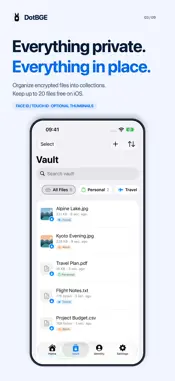
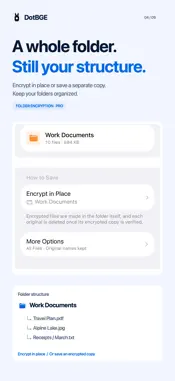
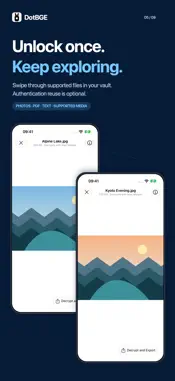
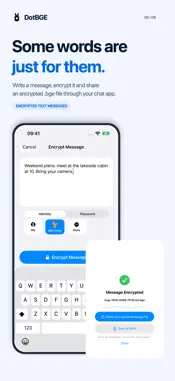
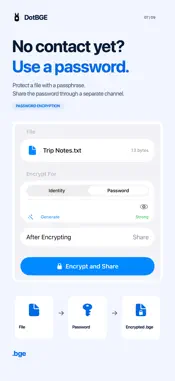
Encrypt private documents and photos, then share them with people you trust. DotBGE protects files directly on your iPhone using a recipient’s identity or a password — with no DotBGE account required. FREE FOR EVERYDAY FILES • Encrypt and decrypt individual files. • Encrypt text messages and share them as .bge files. • Keep up to 20 encrypted files in your iOS vault. • Use one identity and preview supported files after decrypting. SHARE WITH THE RIGHT PERSON Add trusted contacts using identity cards. Choose a recipient to create files that only their private key can decrypt, without exchanging a shared password. Share your own card as a QR code, link or .bgekey file so others can encrypt files for you. PREFER A PASSWORD? Protect a file with a passphrase for one-time sharing. The recipient can open it in DotBGE using that password. Send the password through a separate channel. A PRIVATE VAULT, KEPT ORGANIZED Unlock your vault with Face ID or Touch ID. Create collections with names, colors and icons, and add a file to several collections without making copies. Optional iCloud sync makes your encrypted vault and collections available across your own devices. DECRYPT, PREVIEW, KEEP EXPLORING View supported photos, PDFs, text, audio and video inside the app. Enable Reuse Authentication in Vault to swipe through supported vault files, and optionally show photo thumbnails. Both settings are off by default. Some previews use protected temporary files; see the privacy policy for details. MESSAGES YOU CAN SHARE Type or paste text, encrypt it for yourself, a contact or with a password, then send the .bge message file through your chat app. Recipients open it in DotBGE to read and copy the decrypted text. MORE FILES, MORE CONTROL WITH PRO • Batch encryption for multiple files. • Folder and structured encryption, with one encrypted package or separate encrypted files. • An unlimited vault and multiple identities. • Saved Quick Tasks for repeating folder workflows. For folder encryption, choose the save location and whether to keep originals. Optionally hide names or select which file types to encrypt. Files outside the selection stay unencrypted. Existing encrypted outputs are skipped, even when the source has changed; Quick Tasks do not automatically refresh those files. ON YOUR DEVICE. IN AN OPEN FORMAT. DotBGE uses RSA-4096 and AES-256-GCM with the documented .bge format. Encryption and decryption run on your device. Open .bge files from Files, Mail or other apps that support document sharing, or encrypt through the share sheet. Pro is available through in-app purchase. Single-file encryption, decryption, encrypted messages and supported previews remain free. Designed for iPhone; runs on iPad in compatibility mode. Terms of Use (EULA): https://www.apple.com/legal/internet-services/itunes/dev/stdfla/ Privacy Policy: https://dotbge.app/privacy
What's New
Version 1.3.0 2026-10-29
DotBGE 1.3.0 makes it easier to encrypt, browse, and organize files. • The free iOS vault now holds up to 20 encrypted files. • Browse your vault with a refres... Technical Analysis
Package Overview Basic metadata
Bundle ID
com.dotbge.app Current Version 1.3.0
Minimum iOS 17.6
Package Size App Store Size
Package Metadata 0 / 6 version records
Detailed binary, privacy manifest, framework, and Info.plist results have not been indexed for this package yet. The verified App Store and archive metadata above remains available.
Developer Information
Known Version Records
0 version records with stored package metadata • 6 known version records
Stored metadata does not guarantee a package is currently available to download.
| Details | Version / IDs | Version date | Action |
|---|---|---|---|
| Not archived | App Store ID: 887431138 | Unknown | Request Version |
| Not archived | App Store ID: 887376847 | Unknown | Request Version |
| Not archived | App Store ID: 886719622 | Unknown | Request Version |
| Not archived | App Store ID: 886369166 | Unknown | Request Version |
| Not archived | App Store ID: 886221186 | Unknown | Request Version |
| Not archived | App Store ID: 885454249 | Unknown | Request Version |