
Preview





Description
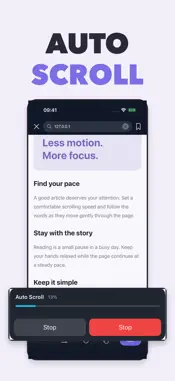
Automate repetitive web actions with WebTap. Set automatic taps, create swipe sequences, scroll long pages, and refresh websites in WebTap’s built-in browser. Save your routines and run them again without setting everything up from scratch. AUTOMATIC TAPS & SEQUENCES Place multiple tap points and choose their execution order. Adjust intervals, touch duration, and repeat counts to suit your web workflow. SWIPES & AUTO SCROLL Create swipe gestures or automatically scroll through articles, stories, feeds, and other long web pages at your preferred speed. AUTO REFRESH Reload a web page at a chosen interval without repeatedly pressing the refresh button. KEYWORD ALERTS Watch the current page for a keyword and receive an alert when it is found. SAVE & REUSE Save your tap sequences and web tool settings as reusable tasks. Open a saved task, adjust it when needed, and run it again. FOR EVERYDAY WEB TASKS • Repeat actions on frequently used websites • Set up tapping routines for compatible browser games • Read long pages with automatic scrolling • Refresh pages at regular intervals • Watch for keywords on a page GET STARTED 1. Open a website in WebTap. 2. Choose your taps, swipes, or web tool. 3. Set the timing and available repeat options. 4. Start the routine or save it for later. IMPORTANT WebTap works only with web pages opened in its built-in browser. It does not control other apps or native iOS games. Keep WebTap open while running automation. Web tools stop when the app moves to the background. Website compatibility may vary. Some features and higher usage limits require WebTap Pro. Legal: Terms of use:https://sites.google.com/view/myoutappterms-of-service Privacy policy:https://sites.google.com/view/webtapauto
What's New
Version 1.2.1 2026-10-26
• Improved saving and reopening web automation tasks. • Refined tap controls and web tool settings. • Updated interface details and translations. Technical Analysis
Package Overview Basic metadata
Bundle ID
com.webClicker.WebTap Current Version 1.2.1
Minimum iOS 15.6
Package Size App Store Size
Package Metadata 1 / 2 version records
Detailed binary, privacy manifest, framework, and Info.plist results have not been indexed for this package yet. The verified App Store and archive metadata above remains available.
Developer Information
Known Version Records
1 version record with stored package metadata • 2 known version records
Stored metadata does not guarantee a package is currently available to download.
| Details | Version / IDs | Version date | Action |
|---|---|---|---|
| 10.05 MB | v1.2.0 App Store ID: 888380902Build: 1.2.0 | 2026-09-07 17:03:55 | Get Version |
| Not archived | App Store ID: 888035785 | Unknown | Request Version |