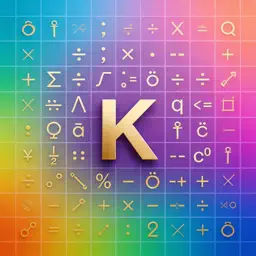
Preview

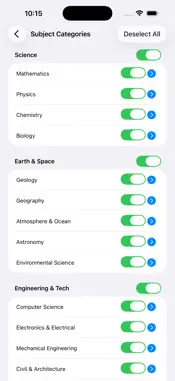


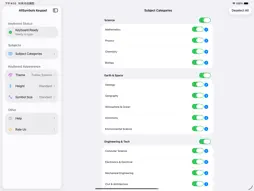
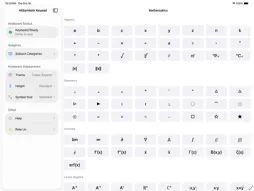




Description
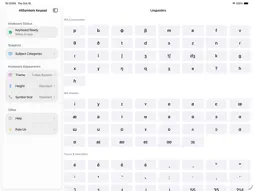
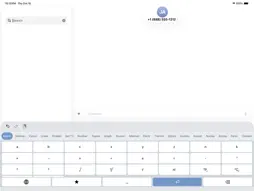
AllSymbols Keypad is a professional iOS keyboard extension for people who type symbols more often than emoji. System keyboards bury math, science and tech symbols in nested pages; AllSymbols Keypad puts them one tap away in WeChat, Notes, Notion, Word, Excel, Safari or any text field. One keyboard, nine domains. Science: math, physics, chemistry, biology. Earth and Space: geology, meteorology, astronomy. Engineering and Tech: computer science, electronics, mechanical, civil and chemical. Medicine and Health: clinical medicine, diagnostics, pharmacy, dentistry, nursing. Humanities and Social Science: linguistics, philosophy, economics, law, history. Business and Finance: accounting, finance, management science. Arts and Design: music, typography, color theory, photography. Specialized Fields: chess and board games, religion and theology. General Symbols: currencies, arrows, superscripts, box drawing, traffic marks. Flat, fast navigation. No nested menus: subjects sit in a swipeable tab bar, each laying its directions out sideways. From Science, open Mathematics, then Calculus: partial derivative, nabla, infinity, limit, sum, integral, contour integral. From Medicine, open Clinical Medicine, then Common Symbols for degree-C, mmHg, micro-litres and Rx. Recent symbols, ready when you are. The star key toggles your recent list, so the symbols you use most float to the top after first use. Long-press any key for a large preview. Optional key click sounds. The keyboard works system-wide exactly like Apple's own extensions. Speaks your language. Subject and direction names are localized in more than 60 languages and match your device language automatically: English, Chinese, Japanese, Korean, French, German, Russian, Arabic, Hindi and many more. Keep it yours. Enable only the subjects you use. A linguist can skip circuit symbols, a quant can skip phonetics, a calligrapher can skip diagnostics. Turning a subject off removes its tab and keeps the bar clean. Real workflows. Draft physics homework in Notes without LaTeX. Reply in WeChat with correct units. Write H2O and alpha-decay notation in Notion. Prepare finance memos with micro, sigma and delta NPV. Annotate patient charts with mmHg, mg/dL and degree-C. Build design decks with copyright, registered and trademark symbols. Optimized for iPhone and iPad: larger symbol grids on iPad, thumb-friendly spacing on iPhone, automatic light and dark mode. Three keyboard heights trade symbol density for screen space. Privacy-first. A standard iOS keyboard extension: no network requests while you type, no keystroke logging, nothing transmitted. Symbol insertion is fully offline. Full Access is optional: symbols work without it, and turning it on syncs your chosen subjects, appearance and recent list. Typing is suspended in password and phone-number fields. Setup in 20 seconds. Install the app, then go to Settings, General, Keyboard, Keyboards, Add New Keyboard and select AllSymbols Keypad. Tap the Globe key to switch and type everywhere. Stop hunting for the sum symbol. Start typing like the paper is already written.
What's New
Version 1.6 2026-10-20
• New Symbol Size setting under Keyboard Appearance: adjust the theme, keyboard height and symbol size (Standard / Large / Extra Large) on one page. • New Help ... Technical Analysis
Package Overview Basic metadata
Bundle ID
com.keystrong.KeyStrong Current Version 1.6
Minimum iOS 15.0
Package Size App Store Size
Package Metadata 0 / 0 version records
Detailed binary, privacy manifest, framework, and Info.plist results have not been indexed for this package yet. The verified App Store and archive metadata above remains available.
Known Version Records
0 version records with stored package metadata
Stored metadata does not guarantee a package is currently available to download.
| Details | Version / IDs | Version date | Action |
|---|