
Preview


Description
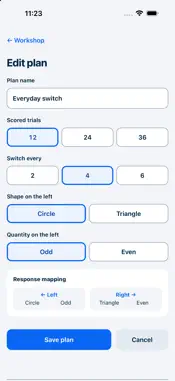
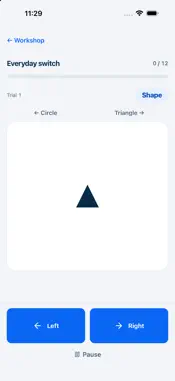
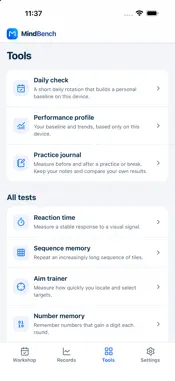
Mind Bench is a personal practice and recording tool. The Rule workshop opens on the home screen: configure a plan, respond as the shape and quantity rules alternate, then review what happened. Make your plan • Use circles and triangles in quantities of 1–4. • Use segmented choices to set the shape and odd/even quantity mapped to the left response. The other option appears on the right. • Use segmented choices for 12, 24 or 36 scored trials, with a rule switch every 2, 4 or 6 trials. • Before scored practice, answer the Shape demo correctly, choose Continue, then answer the Quantity demo correctly. Both demos are unscored. • Respond with the left/right buttons or arrow keys. The first scored trial uses shape. Review each session See accuracy for the whole session, rule switches and rule repeats, with median correct response times and sample counts. Vertical replay cards show each trial's material, rule, result and time. Expand a card for your response, expected response, input method and recorded time. Conditions and interruptions have separate expandable sections. Keep interruption records Pauses, resumed sessions and time away from the app create separate interruption records. Resume with replacement material; interrupted attempts do not enter accuracy or timing statistics. Saved sessions retain their original plan even if that plan is later edited or deleted. Repeat and compare Repeating a plan uses a new material sequence. Select another completed record to view both sessions' original statistics. Deltas appear only when rule settings and actual input types match, recorded conditions are compatible and enough data is available. Otherwise, the report shows the reasons. A session restored across an app restart is also excluded from deltas when its conditions cannot be verified. Differences describe two observations; they do not establish ability or prove a training effect. Export and explore Repeat or export a session from the report's bottom actions. JSON export uses the system export interface to save or share it. Records normally stay on your device. If persistent storage is unavailable, the app explicitly warns that storage is temporary. Tools retains the eight earlier activities: reaction time, sequence memory, aim trainer, number memory, verbal memory, number sequence, visual memory and typing speed. Mind Bench is for personal practice. It is not a medical assessment, diagnostic tool or IQ test. Practice records do not prove a training effect or promise cognitive improvement. Your device, input method, display conditions and circumstances can affect recorded results.
Technical Analysis
Package Overview Basic metadata
Bundle ID
com.gavin.mindbench Current Version 1.0.1
Minimum iOS 15.0
Package Size App Store Size
Package Metadata 0 / 0 version records
Detailed binary, privacy manifest, framework, and Info.plist results have not been indexed for this package yet. The verified App Store and archive metadata above remains available.
Known Version Records
0 version records with stored package metadata
Stored metadata does not guarantee a package is currently available to download.
| Details | Version / IDs | Version date | Action |
|---|