
Preview



Description
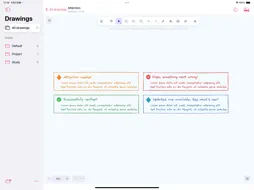
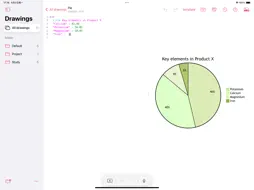
Let AI draw, edit, and organize your entire diagram library. Drawing Studio brings draw.io, Excalidraw, and Mermaid together with an AI assistant that understands your drawings. Create a diagram from a prompt and refine it in conversation. Ask AI to search and organize all your drawings, or handle many documents at once. Adjust anything by hand in the editor, and keep your work growing with folders, version history, and iCloud sync. FROM A PROMPT TO AN EDITABLE DIAGRAM Ask for a first draft instead of starting from a blank canvas: • "Create a flowchart for an order, from payment to delivery." • "Draw a sequence diagram for a user signing in." • "Make a mind map for planning a product launch." Then keep going: add an exception path, rename steps, or reorganize a section. AI reads and edits the drawing directly, so the result is an editable diagram, not a reply to copy elsewhere. AI ACROSS YOUR WHOLE LIBRARY • Ask across documents: "Which of my drawings cover the sign-in flow?" AI searches all your drawings and summarizes them, without opening them first. • Create and organize in bulk: generate several diagrams from a description or attachments, then create folders, move, and rename. • Edit drawings that aren't open: AI works through them one by one in a separate AI Workspace window, so you can watch every step. • Stay in control: a banner shows while AI is editing and you can stop it at any time. AI won't overwrite changes you just made, and it always asks before moving anything to Recently Deleted. • Convert formats: turn a Mermaid document into editable draw.io or Excalidraw shapes. THREE EDITORS, ONE WORKSPACE • Excalidraw: hand-drawn-style sketches, whiteboards, and visual notes with shapes, text, and arrows. • draw.io: structured diagrams for systems, processes, UML, and technical documentation. • Mermaid: diagrams as code, including flowcharts, sequence diagrams, class diagrams, and Gantt charts. Drawing and editing do not require AI setup. Draw by hand, create with AI, or combine both in the same document. KEEP YOUR WORK ORGANIZED • Group drawings into folders by project or topic. • Revisit earlier versions with document history. • Sync across iPhone, iPad, and Mac with iCloud. • Export diagrams as PNG or SVG. DRAWING STUDIO PRO A one-time purchase, no subscription, for iPhone, iPad, and Mac. Pro features added later are included: • MCP server (Mac): let AI agents such as Claude Code and Cursor search, create, and edit your drawings, for example drawing an architecture diagram straight from your codebase. You allow each new client first. • Export images with AI: PNG, JPEG, or SVG. • Full version history: the free plan shows the last 30 days; older versions are kept and appear when you upgrade. CHOOSE YOUR AI MODEL AI use requires a configured, compatible model; availability and results depend on the model and provider. Third-party services may require an account and charge for usage separately. YOUR DOCUMENTS AND AI REQUESTS Documents are stored locally and can sync through iCloud. When you use a cloud AI provider, your prompts and the document content needed for the task are sent to that provider for processing. Its terms and privacy policy apply. The MCP server runs only on your Mac. Review generated diagrams before relying on or sharing them.
What's New
Version 4.0.0 2026-11-17
Drawing Studio 4.0 brings a new AI assistant that works across your whole library, not just the open drawing. AI ASSISTANT • Works with all your drawings: open...Drawing Studio 4.0 brings a new AI assistant that works across your whole library, not just the open drawing. AI ASSISTANT • Works with all your drawings: open AI from the document list to organize folders, search, and ask questions across documents, without opening them first. • Handles many drawings at once: create diagrams in bulk from a description or attachments, and edit documents that aren't open. AI edits them one by one in a separate AI Workspace window, so you can watch the progress. • Edits you can trust: a banner shows when AI is editing, and you can stop it at any time. AI won't overwrite changes you just made, respects view lock, and always asks before moving documents to Recently Deleted, listing them by name. • Mac: a standalone AI Assistant window (⌥⌘I). FORMAT CONVERSION • Convert a Mermaid document to draw.io or Excalidraw, laid out automatically as editable shapes. DRAWING STUDIO PRO (one-time purchase, no subscription, for iPhone, iPad and Mac) • MCP server (Mac): let AI agents such as Claude Code and Cursor search, create and edit your drawings. • Export images with AI: PNG, JPEG or SVG. • Full version history: the free plan shows the last 30 days; older versions are kept and appear when you upgrade. Plus bug fixes and stability improvements. Technical Analysis
Package Overview Basic metadata
Bundle ID
com.mxc.drawBook Current Version 4.0.0
Minimum iOS 17.0
Package Size App Store Size
Package Metadata 0 / 9 version records
Detailed binary, privacy manifest, framework, and Info.plist results have not been indexed for this package yet. The verified App Store and archive metadata above remains available.
Known Version Records
0 version records with stored package metadata • 9 known version records
Stored metadata does not guarantee a package is currently available to download.
| Details | Version / IDs | Version date | Action |
|---|---|---|---|
| Not archived | App Store ID: 878431069 | Unknown | Request Version |
| Not archived | App Store ID: 878003971 | Unknown | Request Version |
| Not archived | App Store ID: 876524325 | Unknown | Request Version |
| Not archived | App Store ID: 876193923 | Unknown | Request Version |
| Not archived | App Store ID: 875609753 | Unknown | Request Version |
| Not archived | App Store ID: 875538983 | Unknown | Request Version |
| Not archived | App Store ID: 875451125 | Unknown | Request Version |
| Not archived | App Store ID: 875401863 | Unknown | Request Version |
| Not archived | App Store ID: 869108397 | Unknown | Request Version |