
Preview



Description
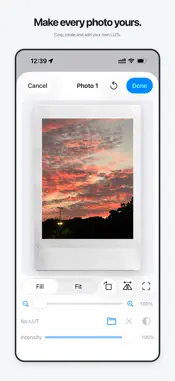
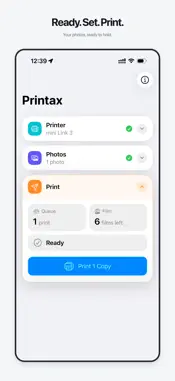
Printax prepares photos and prints them on instax mini printers, from your iPhone or iPad. Choose photos from your library, or touch and hold Add Photos to pick them from Files. Preview and adjust each photo, then check the queue before you print. • Crop with Fill or Fit, then rotate, flip, zoom, and position each photo. • Keep the original look, let Ultra adjust exposure and highlights for print, or fine-tune light and color yourself. • Import a 3D .cube LUT from Files, set its intensity, and compare with the original. • Queue your photos and set the number of copies for each. • See how much film is left and which photos need more sheets. • Check the printer's connection, battery, remaining film, and print status. Works with instax mini Link, mini Link 2, and mini Link 3. You need one of these printers and instax mini film. Square and Wide printers are not supported. Printax keeps your queue and imported LUTs only while the app is running. If it cannot confirm that a print finished, it asks you to check the printer before you try again. Printax is an independent app and is not affiliated with or endorsed by FUJIFILM. Printax includes optional, one-time tips to support the developer. Tips do not unlock additional features, content, or services. All app features are available without tipping.
What's New
Version 1.4 2026-10-30
• Printax now reconnects to your last printer automatically. • Printed photos stay in the queue, ready to edit and print again. • Printer status fits wider scre... Technical Analysis
Package Overview Basic metadata
Bundle ID
shisheng.studio.Printax Current Version 1.4
Minimum iOS 17.6
Package Size App Store Size
Package Metadata 0 / 0 version records
Detailed binary, privacy manifest, framework, and Info.plist results have not been indexed for this package yet. The verified App Store and archive metadata above remains available.
Developer Information
Known Version Records
0 version records with stored package metadata
Stored metadata does not guarantee a package is currently available to download.
| Details | Version / IDs | Version date | Action |
|---|