Preview








Description
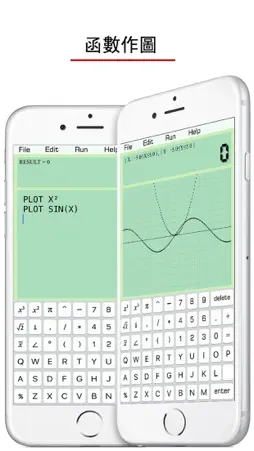
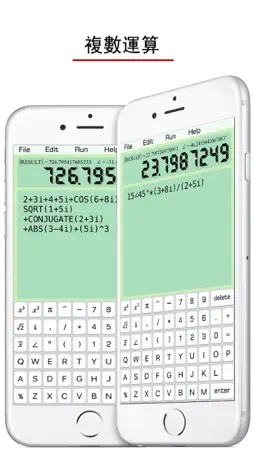
輸入長長的計算式時,修改非常方便 ! 就像是在記事本中寫算數題一樣 ! 可以計算複數、科學計算、函數作圖、統計計算、積分計算 ! • It Supports the File Management ! 該計算器支持完整的文件管理系統 ! - Create a file 創建 - Save 保存 - Open 打開 - Delete 刪除 • Mathematical Functions: 數學函數 SIN(X) : sine of x COS(X) : cosine of x TAN(X) : tangent of x COT(X) : cotangent of x ASIN(X) : arcsine of x ACOS(X) : arccosine of x ATAN(X) : arctangent of x SINH(X) : hyperbolic sine COSH(X) : hyperbolic cosine TANH(X) : hyperbolic tangent ASINH(X) : inverse hyperbolic sine ACOSH(X) : inverse hyperbolic cosine ATANH(X) : inverse hyperbolic tangent SQRT(X) : square root of x ABS(X) : absolute value of x FCT(X) : x factorial LOG(X,Y) : logarithm of y to base x LN(X) : natural logarithm of x LOG(X) : base-10 logarithm of x LOG10(X) : base-10 logarithm of x LOG2(X) : base-2 logarithm of x EXP(X) : base-e exponential of x ERF(X) : the error function of x ERFC(X) : the complementary error function of x ROUND(X) : integral nearest to x CEIL(X) : the smallest integral that is not less than x FLOOR(X) : the largest integral that is not greater than x TGAMMA(X) : the gamma function of x LGAMMA(X) : the natural logarithm of the absolute value of the gamma function of x X^Y : y-th power of x • Statistical functions: 統計函數 SUM(a1,a2,a3,a4) : a1+a2+a3+a4 求和 AVERAGE(a1,a2,a3,a4) : (a1+a2+a3+a4)÷4 求平均數 VARIANCE(a1,a2,a3,a4) : variance 方差 SD(...) : standard deviation 標準差 SUMSQ(...) : sum of squares 平方和 AD(...) : absolute deviation 絕對方差 CV(...) : coefficient of variation 變異係數 SVARIANCE(...) : sample variance 樣本方差 SSD(...) : sample standard deviation 樣本標準差 SCV(...) : sample coefficient of variance 樣本變異係數 • Help Manual: 幫助文檔 “//” 指註釋。被註釋的語句不執行。 A=2 B=3 C=A+B Click “Run”, the screen shows: C=5 If the line C=A+B is annotated , A=2 B=3 //C=A+B Click “Run”, the screen shows: B=3 - Variable Naming Rules: 變量名命名規則: Start with letters, and not involving keywords. 需字母開頭。不得包含關鍵字。 A, A1, B25, HAT (對) PRINT1, COS (錯) - The Usage of PRINT: PRINT 關鍵字的使用方法: A=10+5 B=10/5 PRITN A,B Click “Run”, the screen shows: A=15 B=2 Default variable name is RESULT , e.g. 如果數值沒有被命名,則默認名為“ RESULT” 16+5*6 Click “Run”, the screen shows: RESULT=46 - Combination & Arrangement: 排列組合 C(n,k) = n!/(k!(n-k)!) 排列 A(n,k) = n!/(n-k)! 組合 - Complex Number 複數 當屏幕中出現“i” 或 “∠”時,系統會自動進入複數計算模式。 e.g. X=3+4i or X=5∠53.1° 只有下面9個函數可用於復數計算 SIN(X), COS(X), TAN(X) COT(X), SINH(X), COSH(X) SQRT(X), ABS(X), CONJUGATE(X) - Integral 積分 INTEGRAL X²,2,4 Default precision is 300 times of calculations. It can be more accurate, e.g. 500 times. 默認精度為300次。如果提高精度,可以修改。 INTEGRAL X²,2,4,500 - Graphics 函數作圖 PLOT SIN(X) PLOT X² Default length = 10, width = 10. Specify the lenght = 20, width = 5. Then we have, 如果什麼都不寫,默認長度為10,寬度為10。可修改如下: PLOT X²,20,5 Default dense is 150 points. It also can be customized, e.g. 200 points. 精度很可調整。 PLOT X²,20,5,200
What's New
Version 1.4 2025-06-30
Built with iOS SDK 18. Technical Analysis
Package Overview Basic metadata
Bundle ID
com.jun.calculator Current Version 1.4
Minimum iOS 15.6
Package Size App Store Size
Package Metadata 0 / 4 version records
Detailed binary, privacy manifest, framework, and Info.plist results have not been indexed for this package yet. The verified App Store and archive metadata above remains available.
Known Version Records
0 version records with stored package metadata • 4 known version records
Stored metadata does not guarantee a package is currently available to download.
| Details | Version / IDs | Version date | Action |
|---|---|---|---|
| Not archived | App Store ID: 875987379 | Unknown | Paid / Arcade |
| Not archived | App Store ID: 841676744 | Unknown | Paid / Arcade |
| Not archived | App Store ID: 841676743 | Unknown | Paid / Arcade |
| Not archived | App Store ID: 819466216 | Unknown | Paid / Arcade |