Preview









Description
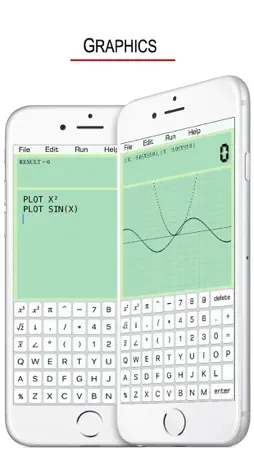
DOING LONG CALCULATIONS IN NOTEBOOK ! GO BACK & CHANGE ERRORS EASILY ! JUST LIKE TYPE IN A TEXT FIELD ! COPY + CUT + PASTE EDIT & SAVE CALCULATION HISTORY ! SCIENTIFIC & GRAPHIC CALCULATOR ! • It Supports the File Management ! - Create a file - Save - Open - Delete • Mathematical Functions: SIN(X) : sine of x COS(X) : cosine of x TAN(X) : tangent of x COT(X) : cotangent of x ASIN(X) : arcsine of x ACOS(X) : arccosine of x ATAN(X) : arctangent of x SINH(X) : hyperbolic sine COSH(X) : hyperbolic cosine TANH(X) : hyperbolic tangent ASINH(X) : inverse hyperbolic sine ACOSH(X) : inverse hyperbolic cosine ATANH(X) : inverse hyperbolic tangent SQRT(X) : square root of x ABS(X) : absolute value of x FCT(X) : x factorial LOG(X,Y) : logarithm of y to base x LN(X) : natural logarithm of x LOG(X) : base-10 logarithm of x LOG10(X) : base-10 logarithm of x LOG2(X) : base-2 logarithm of x EXP(X) : base-e exponential of x ERF(X) : the error function of x ERFC(X) : the complementary error function of x ROUND(X) : integral nearest to x CEIL(X) : the smallest integral that is not less than x FLOOR(X) : the largest integral that is not greater than x TGAMMA(X) : the gamma function of x LGAMMA(X) : the natural logarithm of the absolute value of the gamma function of x X^Y : y-th power of x • Statistical functions: SUM(a1,a2,a3,a4) : a1+a2+a3+a4 AVERAGE(a1,a2,a3,a4) : (a1+a2+a3+a4)÷4 VARIANCE(a1,a2,a3,a4) : variance SD(...) : standard deviation SUMSQ(...) : sum of squares AD(...) : absolute deviation CV(...) : coefficient of variation SVARIANCE(...) : sample variance SSD(...) : sample standard deviation SCV(...) : sample coefficient of variance • Help Manual: “//” means a line comment or annotation. A=2 B=3 C=A+B Click “Run”, the screen shows: C=5 If the line C=A+B is annotated , A=2 B=3 //C=A+B Click “Run”, the screen shows: B=3 - Variable Naming Rules: Start with letters, and not involving keywords. A, A1, B25, HAT (right) PRINT1, COS (wrong) - The Usage of PRINT: A=10+5 B=10/5 PRITN A,B Click “Run”, the screen shows: A=15 B=2 Default variable name is RESULT , e.g. 16+5*6 Click “Run”, the screen shows: RESULT=46 - Combination & Arrangement: C(n,k) = n!/(k!(n-k)!) A(n,k) = n!/(n-k)! - Complex Number When there is “i” or “∠” on the screen, it automatically enters Complex Number Calculation Mode. e.g. X=3+4i or X=5∠53.1° 9 functions are available for the Mode. SIN(X), COS(X), TAN(X) COT(X), SINH(X), COSH(X) SQRT(X), ABS(X), CONJUGATE(X) - Integral INTEGRAL X²,2,4 Default precision is 300 times of calculations. It can be more accurate, e.g. 500 times. INTEGRAL X²,2,4,500 - Graphics PLOT SIN(X) PLOT X² Default length = 10, width = 10. Specify the lenght = 20, width = 5. Then we have, PLOT X²,20,5 Default dense is 150 points. It also can be customized, e.g. 200 points. PLOT X²,20,5,200
What's New
Version 1.4 2025-06-30
Built with iOS SDK 18. Technical Analysis
Package Overview Basic metadata
Bundle ID
com.jun.calculator Current Version 1.4
Minimum iOS 15.6
Package Size App Store Size
Package Metadata 0 / 4 version records
Detailed binary, privacy manifest, framework, and Info.plist results have not been indexed for this package yet. The verified App Store and archive metadata above remains available.
Known Version Records
0 version records with stored package metadata • 4 known version records
Stored metadata does not guarantee a package is currently available to download.
| Details | Version / IDs | Version date | Action |
|---|---|---|---|
| Not archived | App Store ID: 875987379 | Unknown | Paid / Arcade |
| Not archived | App Store ID: 841676744 | Unknown | Paid / Arcade |
| Not archived | App Store ID: 841676743 | Unknown | Paid / Arcade |
| Not archived | App Store ID: 819466216 | Unknown | Paid / Arcade |