Preview


Description
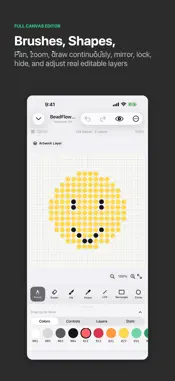
BeadFlow is an offline-first bead pattern generator, editor, and physical assembly tool. Every core creation feature works on the device. Start in several ways: - Import a photo and control canvas size, color count, dithering, crop mode, and background removal - Turn text into pixel lettering, signs, and labels - Generate high-contrast bead QR codes from a URL or text - Draw freely on a blank canvas - Browse built-in offline templates and copy them into editable projects - Use randomized themes, sizes, color limits, and symmetry rules for local practice The full canvas editor includes: - Pencil, eraser, fill, picker, line, rectangle, circle, stamp, and mirror tools - Numeric canvas sizes from 1 to 512 cells, plus pan, zoom, and double-tap fit - Selection, copy, cut, paste, delete, duplicate, and directional nudging - Real independent layers with visibility, locking, opacity, duplication, reordering, merging, and deletion - Grid, coordinates, bead codes, symmetry drawing, and palette replacement When the design is ready: - Count total beads, colors, reserve quantities, and estimated boards - Build by color, row, or 30×30 board area - Export PNG images, PDF sheets, CSV material lists, and editable BeadFlow project files - Export and restore a complete local backup Projects, preferences, and photo conversion are processed locally by default. BeadFlow includes no advertising SDK or third-party analytics SDK, and it does not automatically upload your designs.
Technical Analysis
Package Overview Basic metadata
Bundle ID
si.any.app.BeadFlow Current Version 1.0
Minimum iOS 17.0
Package Size App Store Size
Package Metadata 0 / 0 version records
Detailed binary, privacy manifest, framework, and Info.plist results have not been indexed for this package yet. The verified App Store and archive metadata above remains available.
Developer Information
Known Version Records
0 version records with stored package metadata
Stored metadata does not guarantee a package is currently available to download.
| Details | Version / IDs | Version date | Action |
|---|