
Preview


Description
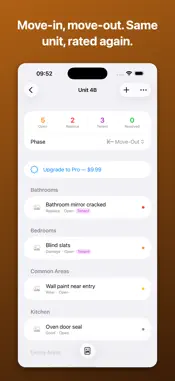
Walk a rental unit at move-in, walk it again at move-out, and hand over the comparison — one record per visit, paired area by area. Property Walkthrough Report is built for the job a generic checklist app gets wrong: the same unit inspected more than once. Every walkthrough is tagged with its phase (Move-In, Periodic or Move-Out), every observation carries a condition rating and a tenant-responsible flag, and the app pairs the move-out walk against the move-in walk so both sides see exactly what changed, where, and how badly. HOW IT WORKS 1. Create a walkthrough — name it after the unit, pick the phase (Move-In / Periodic / Move-Out), add who inspected it and the company on the report. 2. Work area by area: Living Areas, Kitchen, Bedrooms, Bathrooms, Common Areas, Exterior/Grounds, Utilities. 3. Log each observation with a condition rating — Good, Wear, Damage or Replace — a written note, and photos you can mark up with arrows and circles right on the phone. Flag it "Tenant responsible" when it is damage beyond normal wear. 4. Export a branded PDF broken down by area, with the phase in the header, tenant-responsible items marked, and the photo evidence printed under the observation it belongs to. WALK IT AGAIN, THEN COMPARE • "Walk This Unit Again" clones the move-in walkthrough as a move-out walkthrough — same areas, same observation titles, ratings reset — so you re-rate each item as you walk. • "Compare with Another Walkthrough" pairs the two by area and title and sorts what matters first: Worse, New, Improved, Same, Not re-checked — with a count of tenant-responsible items. • Export the comparison as its own PDF or as plain text for a message or email. EXPORT THE WAY YOUR OFFICE WORKS • PDF report per walkthrough, grouped by area, with photos. • Comparison PDF (move-in vs move-out). • CSV with unit, phase, area, observation, condition, status and tenant-responsible columns for the spreadsheet you already keep. BUILT FOR • Landlords and small property owners handling their own tenant turnovers • Property managers and letting agents documenting check-in and check-out • Tenants who want their own photographed record before handing back keys WHY A CAMERA ROLL IS NOT ENOUGH Loose photos are not a record anyone can act on. This app pins every photo to an area of the unit, a condition rating and a written note, then prints them together — so when a deposit is being settled, the conversation starts from what changed and where, not from a scroll through someone's camera roll. WHAT IT DOES NOT DO It does not calculate charges or produce a deposit itemization for you. It documents condition and flags responsibility; the money conversation stays yours. EVERYTHING STAYS ON YOUR DEVICE No account. No sign-in. No cloud upload. No analytics. Works in airplane mode — basements and empty units rarely have signal. Your photos and notes never leave the phone; PDFs and CSVs are generated on-device and shared only when you choose to share them. FREE AND PRO The free version records complete walkthroughs, compares them and exports full PDF and CSV reports, limited to two saved walkthroughs, with a small "Made with Property Walkthrough" credit at the foot of each page. Property Walkthrough Pro is a one-time purchase — no subscription — that removes that per-page credit and lifts the limit on saved walkthroughs. The four condition ratings follow common move-in / move-out inspection practice. This app documents what you observe; it is not legal advice, and deposit rules differ by jurisdiction — check your local requirements.
Technical Analysis
Package Overview Basic metadata
Bundle ID
com.appfactory.propertywalkthrough Current Version 1.0
Minimum iOS 17.0
Package Size App Store Size
Package Metadata 0 / 0 version records
Detailed binary, privacy manifest, framework, and Info.plist results have not been indexed for this package yet. The verified App Store and archive metadata above remains available.
Known Version Records
0 version records with stored package metadata
Stored metadata does not guarantee a package is currently available to download.
| Details | Version / IDs | Version date | Action |
|---|