Preview


Description
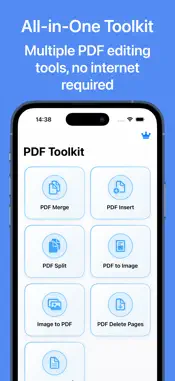
PDF Assistant is a powerful all-in-one PDF processing tool that provides professional PDF handling solutions. 【KEY FEATURES】 • PDF Merge: Quickly combine multiple PDFs into one • PDF Split: Divide PDF documents into separate files • PDF Insert: Add new pages to existing PDFs • PDF to Image: Convert PDF pages to high-quality images • Image to PDF: Batch convert images to PDF format • PDF Page Delete: Easily remove specific pages • PDF Watermark: Add custom text or image watermarks 【WHY CHOOSE US】 • User-Friendly: Clean interface with intuitive controls • Comprehensive: All essential PDF tools in one app • Fast Processing: Advanced algorithms for quick results • Local Processing: All operations performed locally for security • No Registration: Start using immediately after download 【PERFECT FOR】 • Work & Study: Organize learning materials and work documents • File Management: Arrange and organize PDF files • Document Editing: Adjust PDF page order • Content Extraction: Extract images from PDFs • Format Conversion: Create PDFs from multiple images 【Subscription Terms】 ■ Subscription Plans • Lifetime (one-time purchase) ■ Member Benefits • Access to all premium features • Unlimited use of all functions • Priority access to new features ■ Subscription Rules • Payment will be charged to iTunes Account at confirmation of purchase • Subscription automatically renews unless auto-renew is turned off at least 24 hours before the end of the current period • Account will be charged for renewal within 24 hours prior to the end of the current period • Any unused portion of a free trial period will be forfeited when purchasing a subscription ■ How to Cancel 1. Open device Settings 2. Tap your Apple ID at the top 3. Tap "Subscriptions" 4. Find "PDF Assistant" and manage subscription ■ Legal • Terms of Service: http://simp.ly/p/5FYqZX • Privacy Policy: http://simp.ly/p/OYXLkD Let PDF Assistant be your PDF expert, making document handling effortless and efficient!
What's New
Version 1.2 2025-09-08
1. Optimize UI display Technical Analysis
Package Overview Basic metadata
Bundle ID
com.rr.PdfAssistant Current Version 1.2
Minimum iOS 16.0
Package Size App Store Size
Package Metadata 0 / 3 version records
Detailed binary, privacy manifest, framework, and Info.plist results have not been indexed for this package yet. The verified App Store and archive metadata above remains available.
Developer Information
Known Version Records
0 version records with stored package metadata • 3 known version records
Stored metadata does not guarantee a package is currently available to download.
| Details | Version / IDs | Version date | Action |
|---|---|---|---|
| Not archived | App Store ID: 877853730 | Unknown | Request Version |
| Not archived | App Store ID: 870699798 | Unknown | Request Version |
| Not archived | App Store ID: 870373605 | Unknown | Request Version |