Preview





Description
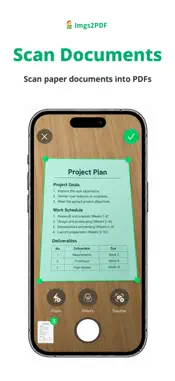
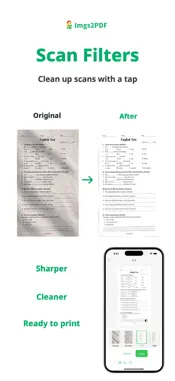
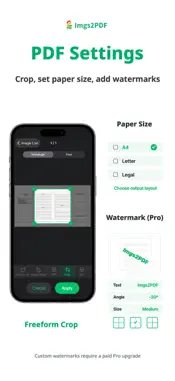
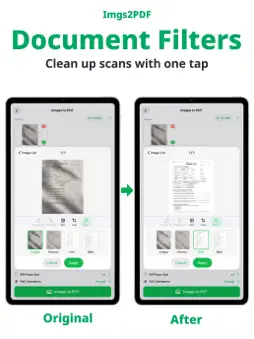
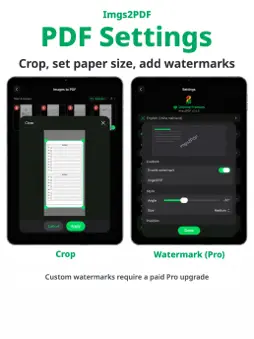
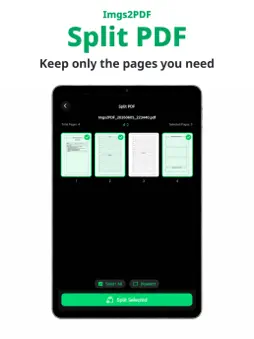
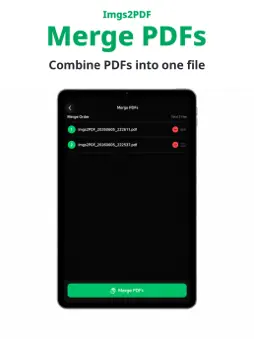
Imgs2PDF is a lightweight PDF tool for converting images to PDF, arranging several images on one page, scanning paper documents, converting PDF to images, and merging, splitting and compressing PDFs. Conversion, image processing and text recognition all happen on your device without uploads, making it ideal for photos, scans, homework, contracts, receipts and everyday documents. Features - Images to PDF – Turn photos, receipts and scans into a PDF to save or share - Multiple images on one page – Arrange photos, receipts, ID documents or scans on a single PDF page. Adjust their position, size and angle for easy filing and printing - Scan documents (iPhone/iPad) – Scan paper documents with automatic cropping and angle correction. Scan several pages in a row and save them as a PDF - Document image effects – Choose Original, Enhance, Print or B&W, and apply the same effect to several images - PDF to Images – Convert PDF pages to images. Save to Photos or share on iPhone and iPad; export to a folder on Mac - Merge PDF – Combine multiple PDF files in order into one document - Split PDF – Select the pages you need and create a new PDF file - Compress PDF – Choose Light, Standard or Maximum compression. Results depend on the document’s content - Crop and split images – Crop images, straighten photographed documents or divide an image into a grid. Premium lets you add horizontal or vertical dividing lines - Text recognition (OCR) – Extract text from images to copy and use elsewhere. Choose the recognition language - Paper size and orientation – Choose A4, A3, Letter and other common paper sizes, in portrait or landscape - Custom watermarks (Premium) – Add your own text watermark when converting images to PDF or PDF pages to images - Image quality – Choose the quality of saved images to balance picture quality and file size - History – Keep converted files handy for browsing and sharing - Cross-platform – Works on iPhone, iPad and Mac - Free use – Create PDFs of up to 5 pages at a time; several images arranged on one page count as one page. Merge up to 3 PDFs at a time. When splitting, choose pages from the original PDF’s first 10 pages - Premium – Remove these three quantity limits, export several files from history at once, compress several PDFs from history, add text watermarks and add image dividing lines. Choose a monthly or yearly auto-renewing subscription, or a one-time lifetime purchase How to cancel an App Store subscription Cancel auto-renewable subscriptions in your Apple Account subscription settings. Access continues until the current subscription period ends. The lifetime purchase does not renew. Terms of Use: https://www.apple.com/legal/internet-services/itunes/dev/stdeula/ Privacy Policy: https://hp60.com/imgs2pdf/about/privacy/
What's New
Version 2.2.1 2026-11-22
Recent updates: - On Mac, drag images or PDFs straight from Finder onto a tool card on the home screen to convert, merge, split or compress them. - The app kee...Recent updates: - On Mac, drag images or PDFs straight from Finder onto a tool card on the home screen to convert, merge, split or compress them. - The app keeps the original when you crop or split very large photos. PDF export adjusts image resolution to suit the selected paper size and quality. - If a compressed PDF's filename is already in use, the app adds a number to the new file's name to prevent overwriting. - Fixed incorrect image dimensions when converting rotated PDF pages to images and misplaced watermarks in Mac exports. - Fixed an issue opening some files from history. The “Recent files” list refreshes more reliably after opening a file from Finder on Mac or converting a file while using multiple windows on iPad. - Improved the reliability of image imports and PDF processing. Clearing the cache now keeps drafts you're editing. - Arrange several images on one PDF page and adjust their position, size and angle. - Improved cropping and zooming, with a fix for the view jumping after zooming. Fixed differences in page size and orientation between previews and exported PDFs. - Scan paper documents on iPhone/iPad, with automatic cropping and angle correction. Scan multiple pages and create a PDF. - New document image effects: Original, Enhance, Print and B&W. Apply an effect to several images at once. - Improved layouts across screen sizes, image importing, large-image processing and PDF previews. - Fixed page rotation changes and missing annotations after PDF compression, plus iPad sharing and file-saving issues. Improved save error messages. Technical Analysis
Package Overview Basic metadata
Bundle ID
com.givebest.Image2PDF Current Version 2.2.1
Minimum iOS 17.0
Package Size App Store Size
Package Metadata 0 / 36 version records
Detailed binary, privacy manifest, framework, and Info.plist results have not been indexed for this package yet. The verified App Store and archive metadata above remains available.
Developer Information
Known Version Records
0 version records with stored package metadata • 36 known version records
Stored metadata does not guarantee a package is currently available to download.
| Details | Version / IDs | Version date | Action |
|---|---|---|---|
| Not archived | App Store ID: 894477849 | Unknown | Request Version |
| Not archived | App Store ID: 892738447 | Unknown | Request Version |
| Not archived | App Store ID: 892408688 | Unknown | Request Version |
| Not archived | App Store ID: 891643358 | Unknown | Request Version |
| Not archived | App Store ID: 891583493 | Unknown | Request Version |
| Not archived | App Store ID: 891532844 | Unknown | Request Version |
| Not archived | App Store ID: 890400065 | Unknown | Request Version |
| Not archived | App Store ID: 889332079 | Unknown | Request Version |
| Not archived | App Store ID: 888864220 | Unknown | Request Version |
| Not archived | App Store ID: 888207991 | Unknown | Request Version |
| Not archived | App Store ID: 887829496 | Unknown | Request Version |
| Not archived | App Store ID: 886579229 | Unknown | Request Version |
| Not archived | App Store ID: 886427530 | Unknown | Request Version |
| Not archived | App Store ID: 885187946 | Unknown | Request Version |
| Not archived | App Store ID: 884942279 | Unknown | Request Version |
| Not archived | App Store ID: 884805905 | Unknown | Request Version |
| Not archived | App Store ID: 884763794 | Unknown | Request Version |
| Not archived | App Store ID: 884593261 | Unknown | Request Version |
| Not archived | App Store ID: 882029964 | Unknown | Request Version |
| Not archived | App Store ID: 880405194 | Unknown | Request Version |
| Not archived | App Store ID: 877984192 | Unknown | Request Version |
| Not archived | App Store ID: 877651988 | Unknown | Request Version |
| Not archived | App Store ID: 876729073 | Unknown | Request Version |
| Not archived | App Store ID: 875791424 | Unknown | Request Version |
| Not archived | App Store ID: 875708820 | Unknown | Request Version |
| Not archived | App Store ID: 875221322 | Unknown | Request Version |
| Not archived | App Store ID: 874276775 | Unknown | Request Version |
| Not archived | App Store ID: 874230337 | Unknown | Request Version |
| Not archived | App Store ID: 874167950 | Unknown | Request Version |
| Not archived | App Store ID: 874039470 | Unknown | Request Version |
| Not archived | App Store ID: 873983913 | Unknown | Request Version |
| Not archived | App Store ID: 873809797 | Unknown | Request Version |
| Not archived | App Store ID: 873454560 | Unknown | Request Version |
| Not archived | App Store ID: 873422041 | Unknown | Request Version |
| Not archived | App Store ID: 873308830 | Unknown | Request Version |
| Not archived | App Store ID: 872291932 | Unknown | Request Version |