
Preview







Description
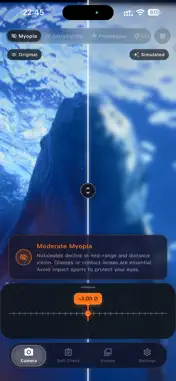
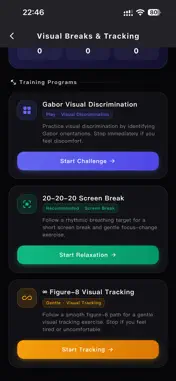
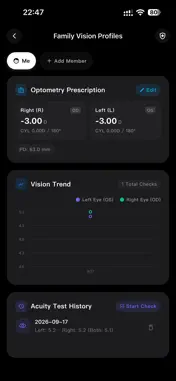
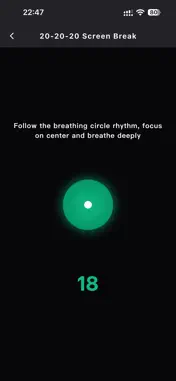
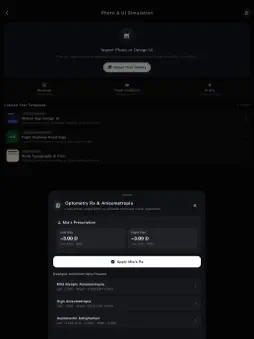
SightFrame is an interactive vision simulator and eye-care educational tool. Using advanced real-time image processing, SightFrame allows you to see the world through the perspective of individuals with myopia, astigmatism, presbyopia, and color vision deficiencies. KEY FEATURES: 1. Real-Time Camera Simulation • Live Diopter Control: Adjust spherical power from 0 to -8.0D to observe realistic distance defocus. • Astigmatism Effects: Directional blur, streaks, and double-vision glare—especially in low-light environments. • Presbyopia Mode: Central focus difficulty simulating age-related near vision loss. • Color Deficiency Filters: Protanopia, Deuteranopia, and Tritanopia color matrix transformations. 2. Realistic Preset Scenes • Explore common everyday environments like night driving, classroom blackboards, metro signs, and rainy streetscapes. • Switch effortlessly between clear vision and simulated refractive errors. 3. Split-Screen Comparison & Fine Tuning • Compare side-by-side (Split View) between normal vision and simulated filters. • Fine-tune blur radius, halo intensity, pupil distance, and astigmatism axis angles. 4. Vision Self-Checks • Explore Visual Clarity, Astigmatism Dial, Red-Green Balance, and Amsler Grid checks. • Save results for personal reference and review changes over time. • Self-checks are informational only and do not provide diagnosis or prescription. 5. Visual Breaks & Tracking • Practice Gabor visual discrimination, guided 20-20-20 screen breaks, and gentle figure-8 visual tracking. • Track completed sessions, streaks, and personal best scores. • Stop immediately if you experience eye strain or discomfort. 6. Family Vision Profiles • Create separate profiles for family members and organize prescription details and self-check history. • Review visual-acuity trends and previous records in one place. • Protect local health records with optional Face ID, Touch ID, or device passcode. 7. Privacy & Clean Experience • 100% On-Device Processing: Camera feed is rendered locally in real time. We NEVER record, save, or upload your photos or videos. • No Ads: Enjoy an uninterrupted, seamless visual journey. DISCLAIMER: SightFrame is intended for educational, empathy, and simulation purposes only. It does not provide medical diagnoses or replace professional eye examinations. For any vision concerns, please consult a certified optometrist or ophthalmologist. Terms of Use (EULA): https://www.apple.com/legal/internet-services/itunes/dev/stdeula/
What's New
Version 1.4.1 2026-10-17
• Redeem an Offer Code to unlock Pro • Added Protanopia and Tritanopia; the previous red-green mode is now named Deuteranopia • Added a 0–100% severity slider t... Technical Analysis
Package Overview Basic metadata
Bundle ID
com.storn.bitong Current Version 1.4.1
Minimum iOS 15.0
Package Size App Store Size
Package Metadata 0 / 0 version records
Detailed binary, privacy manifest, framework, and Info.plist results have not been indexed for this package yet. The verified App Store and archive metadata above remains available.
Known Version Records
0 version records with stored package metadata
Stored metadata does not guarantee a package is currently available to download.
| Details | Version / IDs | Version date | Action |
|---|