
Preview
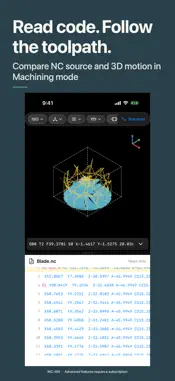


Description
Edit NC/G-code, review 3D toolpaths, inspect stock removal and view STEP/STL models on iPhone and iPad. iNC-Mill brings programs, toolpaths and part geometry into one workspace for shop-floor review, programming practice and teaching. File management and basic 3D viewing are free. NC editing, simulation, knowledge references, calculators, advanced 3D tools and settings, and AI questions require an active subscription. NC/G-CODE EDITING • Import NC programs from Files, AirDrop or other apps • Edit with syntax highlighting, line navigation, search and replace • Renumber or remove N block numbers in selected lines or an entire file • Review very large programs in a dedicated read-only mode MILLING, TURNING AND MACROS • Watch stock material removal during 3-axis milling and turning playback • Inspect 3-axis and 5-axis toolpaths with distinct rapid, feed and arc motion • Trace FANUC macro execution flow and machine state • Work with Mitsubishi M800/M80 milling and turning programs, with matching command references, parameter forms and examples • Review macros, subprograms and canned cycles within the supported scope of the selected controller CODE BESIDE TOOLPATHS • Compare 3D toolpaths with read-only NC code in resizable Machining-mode panes • Follow associated source lines and available tool, feed, spindle and position readouts • Navigate by move, Z change, cutting section or tool section • Play forward or in reverse; adjust speed, path colors and viewing direction • Keep the camera and playback position when switching preview modes STEP/STL MODEL VIEWING • Open STP/STEP and STL files; rotate, zoom and use standard views • Explore STEP assembly trees, hide or isolate components, and adjust exploded views • Inspect internal geometry with interactive section planes • Measure supported STEP geometry: distances, radii, angles, areas and model dimensions • Measure between toolpath points and visible simulated workpiece surfaces Model viewing is read-only. STEP measurements use supported CAD geometry; STL and simulated workpiece measurements are mesh-based approximations. Toolpath curves use generated segments. Measurements do not certify physical part dimensions. FILES AND MACHINING TOOLS • Create, import, search and organize files; reopen recent files • Move files and folders in batches and restore Recently Deleted items • Review program tool checklists to verify executed tools, spindle speeds and feedrates • Manage machine and tool definitions; browse G/M-code references • Use milling, turning and quick calculators ON-DEVICE WORKFLOW Core NC editing, parsing, model viewing, toolpath review and simulation run on device. These tools do not require uploading your machining files. iNC-Mill supports program review and visualization. Professional verification, collision checks and machine, tooling and fixture checks remain necessary before machining. SUBSCRIPTIONS Monthly and yearly plans, prices and any available trial are shown in the App Store at purchase time. Payment is charged to your Apple ID after confirmation. Subscriptions renew automatically unless canceled at least 24 hours before the current period ends. Manage or cancel in Settings > Apple ID > Subscriptions. Terms of Use: https://inc-mill.com/en/terms Privacy Policy: https://inc-mill.com/en/privacy
What's New
Version 1.0.22 2026-10-29
1.0.22: Added Program Tool Checklist and improved NC editor and preview experience. • Added Program Tool Checklist: automatically extracts executed tools, spin... Technical Analysis
Package Overview Basic metadata
Bundle ID
fghnntp.iNC Current Version 1.0.22
Minimum iOS 16.0
Package Size App Store Size
Package Metadata 2 / 18 version records
Detailed binary, privacy manifest, framework, and Info.plist results have not been indexed for this package yet. The verified App Store and archive metadata above remains available.
Developer Information
Known Version Records
2 version records with stored package metadata • 18 known version records
Stored metadata does not guarantee a package is currently available to download.
| Details | Version / IDs | Version date | Action |
|---|---|---|---|
| Not archived | v1.0.17 App Store ID: 891829191Build: 1.0.17 | 2026-09-26 19:01:25 | Request Version |
| Not archived | v1.0.16 App Store ID: 891410881Build: 1.0.16 | 2026-09-22 14:52:26 | Request Version |
| 82.98 MB | v1.0.17 App Store ID: 891280272Build: 1.0.17 | 2026-09-26 19:01:25 | Get Version |
| Not archived | v1.0.14 App Store ID: 891241160Build: 1.0.14 | 2026-09-13 02:41:26 | Request Version |
| Not archived | v1.0.13 App Store ID: 890912564Build: 1.0.13 | 2026-09-10 23:55:06 | Request Version |
| Not archived | v1.0.12 App Store ID: 890629580Build: 1.0.12 | 2026-09-04 19:49:56 | Request Version |
| Not archived | v1.0.11 App Store ID: 889435508Build: 1.0.11 | 2026-08-29 23:12:13 | Request Version |
| 48.64 MB | v1.0.15 App Store ID: 885360828Build: 1.0.15 | 2026-09-14 21:55:10 | Get Version |
| Not archived | v1.0.9 App Store ID: 885103722Build: 1.0.9 | 2026-05-05 04:31:40 | Request Version |
| Not archived | v1.0.8 App Store ID: 885025032Build: 1.0.8 | 2026-04-29 13:53:54 | Request Version |
| Not archived | v1.0.7 App Store ID: 884840689Build: 1.0.7 | 2026-04-24 09:13:18 | Request Version |
| Not archived | v1.0.6 App Store ID: 884393177Build: 1.0.6 | 2026-04-13 14:00:06 | Request Version |
| Not archived | v1.0.5 App Store ID: 883077747Build: 1.0.5 | 2026-03-30 08:02:31 | Request Version |
| Not archived | v1.0.4 App Store ID: 882863071Build: 1.0.4 | 2026-03-04 09:56:29 | Request Version |
| Not archived | v1.0.3 App Store ID: 882252744Build: 1.0.3 | 2026-02-17 11:54:24 | Request Version |
| Not archived | v1.0.2 App Store ID: 880485895Build: 1.0.2 | 2025-12-16 03:47:33 | Request Version |
| Not archived | v1.0.1 App Store ID: 880402774Build: 1.0.1 | 2025-12-08 07:17:35 | Request Version |
| Not archived | v1.0 App Store ID: 880149166Build: 1.0 | 2025-12-03 03:41:50 | Request Version |