
Preview



Description
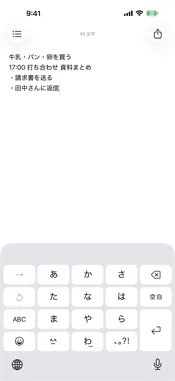
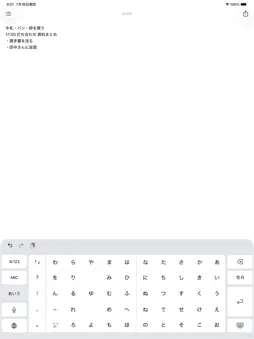
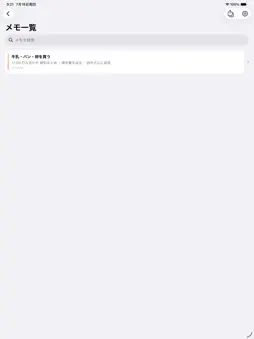
Between “open” and “write,” there is nothing. Byosoku Memo is a zero-friction notepad: the moment it launches, a new note and the keyboard are already there. No hunting for buttons, no flipping pages — the app finally keeps up with “let me jot this down before I forget.” ■ Open = start typing Tap the icon and a blank note with the keyboard appears at once. No splash screen, no confirmation dialog. ■ Auto-save, always There is no save button. Every keystroke is saved instantly. Close an empty note and nothing is left behind — no junk notes. ■ Lock Screen & Home Screen widgets Jump straight from a Lock Screen widget into a new note. The Home Screen widget lists your recent notes; tap one to open it directly. ■ Control Center (iOS 18) Add “New Note” to Control Center and start writing from anywhere with one tap. ■ Smart full-text search Kana, full/half-width and upper/lowercase are all treated alike, with multi-word AND search to find any note fast. ■ Export & share Share a single note, or export your whole list as a text file. All data is stored on your device. No account required. [Pricing] Every feature is available. A banner ad is shown at the bottom of the screen. A one-time “Remove Ads” purchase hides it permanently (no subscription). Privacy policy: https://honki.ai/byosoku-memo/privacy.html
What's New
Version 1.0.1 2026-07-31
- Fixed the in-app Terms, Privacy Policy and Support links, which did not open. - Minor fixes and stability improvements. Technical Analysis
Package Overview Basic metadata
Bundle ID
com.jaydencj.byosokumemo Current Version 1.0.1
Minimum iOS 17.0
Package Size App Store Size
Package Metadata 0 / 0 version records
Detailed binary, privacy manifest, framework, and Info.plist results have not been indexed for this package yet. The verified App Store and archive metadata above remains available.
Developer Information
Known Version Records
0 version records with stored package metadata
Stored metadata does not guarantee a package is currently available to download.
| Details | Version / IDs | Version date | Action |
|---|