Preview




Description
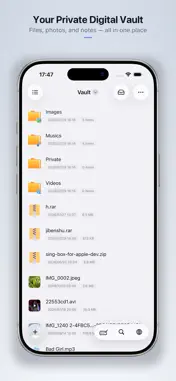
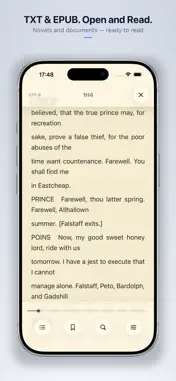
Vault is a local-first private file space that helps you keep photos, videos, documents, notes, and downloads together—secure on your device and ready to preview anytime. Whether it’s private content you don’t want in Photos, or files gathered from your computer, cloud drives, or NAS, Vault brings it all into one place. [Private Local Storage] • Organize with folders; create folders and text notes • Import from Photos, Files, Camera, clipboard, document scanning, and more • Import from your computer (Wi‑Fi), iTunes, and other apps • Every import is automatically encrypted with AES-256 • Built-in privacy browser—no lasting browsing history; downloads save to your folders [Cloud & Network] • Connect Google Drive, Dropbox, OneDrive, Baidu Netdisk, iCloud, and Nutstore • Support FTP/FTPS, SFTP, SMB, and WebDAV for NAS, servers, and shared folders • Download remote files into local folders for centralized management [Preview & Organize] • Preview images, GIFs, video, and audio; read text and EPUB • Extract ZIP, RAR, 7z, TAR, GZIP, XZ, ZSTD, BZ2, LZ4, LZMA, ISO, CAB, JAR, LZH, CPIO, XAR, RPM, ZIPX, WARC, DZIP • Multi-volume and password-protected archives • Create ZIP, 7z, TAR, GZIP, XZ, ZSTD; set compression level; optional password and split volumes • Rename, move, copy, share, and other everyday file actions • Backup and restore to help with device changes or migration [Privacy & Security] • Password Lock: automatically lock when you leave the app • Stealth Mode: a separate space for private files, FTP, and cloud accounts—open it with a dedicated password • App Disguise: unlock screen can appear as a Calculator, Flip Clock, Compass, or Timer • Intrusion Alert: record unusual attempts after repeated wrong passwords • Change the app icon to stay more discreet [Pro] Upgrade to Pro to remove ads and unlock App Disguise, Stealth Mode, Intrusion Alert, all app icons, compression passwords, and more. Subscriptions renew automatically unless canceled at least 24 hours before the end of the current period. Manage or cancel in your Apple ID account settings. Lifetime is a one-time purchase. Most content stays on your device by default. Third-party services are used only when you choose optional features such as cloud sign-in or network file transfer. Keep what matters—private and out of casual view—in Vault. [Privacy Policy & Terms] Privacy Policy: https://vault.xiaojiays.workers.dev/PrivacyPolicy.en Terms of Use (EULA): https://vault.xiaojiays.workers.dev/TermsOfUse.en Questions: [email protected]
What's New
Version 1.2.6 2026-11-18
Added a backup reminder toggle. Technical Analysis
Package Overview Basic metadata
Bundle ID
com.walala.wg Current Version 1.2.6
Minimum iOS 17.4
Package Size App Store Size
Package Metadata 0 / 0 version records
Detailed binary, privacy manifest, framework, and Info.plist results have not been indexed for this package yet. The verified App Store and archive metadata above remains available.
Developer Information
Known Version Records
0 version records with stored package metadata
Stored metadata does not guarantee a package is currently available to download.
| Details | Version / IDs | Version date | Action |
|---|