
Preview




Description
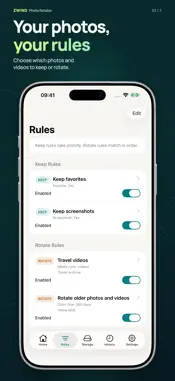
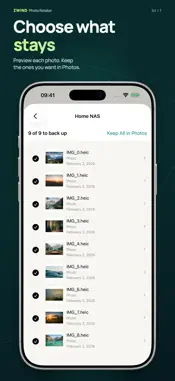
Set your photo rules once. Then start each scan with one tap: keep what matters on your iPhone, back up older photos and videos to your own storage, and confirm their removal. Keep making room as your library grows. A REPEATABLE ROUTINE FOR YOUR PHOTO LIBRARY Photo rotation means reusing the same rules as new photos arrive. For example, keep your favorites and recent photos on your phone, and move older videos to your NAS. Next time, your saved rules find the next batch. You do not have to sort your whole library again. CHOOSE WHAT STAYS AND WHAT MOVES Create Keep and Rotate rules using age, media type, albums, favorites, screenshots, screen recordings, or recognized text. Keep rules take priority. Review the selected items before starting a backup; scanning alone does not delete anything. YOUR ORIGINALS, YOUR STORAGE Back up to a compatible NAS, a computer's SMB shared folder, or a WebDAV server. Photos and videos are saved without re-encoding, including Live Photo companion videos. Scanning, text recognition, and rule evaluation run on your device; backups go to the destination you choose. VERIFY FIRST, DELETE WITH YOUR CONFIRMATION The app reads back and checks the backup before requesting deletion through Photos. You confirm the system deletion request. Keep the app open while it works. History records scan and backup results and lets you resume supported interrupted operations. ABOUT DELETION AND FREE SPACE Run your saved rules regularly to make room for new photos. Each rotation starts when you tap Scan & Rotate, review the selected items, and confirm the backup. Deleting from Photos can also delete from iCloud Photos and other synced devices. Deleted items stay in Recently Deleted for up to 30 days. The device space they occupy is released when they are permanently deleted there. To free that space sooner, open Photos → Recently Deleted and delete them permanently after checking your backup. You cannot recover them from Photos afterward. You can also check Settings → General → iPhone Storage → Photos. If Empty Recently Deleted is offered, use it to empty the album. FREE TO ROTATE, PRO TO REMOVE ADS Rule editing and rotation are available in the free version, which may show ads. A one-time Pro purchase removes ads. Restore purchases from Settings. SUPPORT Email: [email protected] Privacy Policy: https://zwind.app/privacy/ Terms of Service: https://zwind.app/terms/ Terms of Use (EULA): https://www.apple.com/legal/internet-services/itunes/dev/stdeula/ Docs and guides: https://zwind.app/docs/zwind-photo-rotator/getting-started/
Technical Analysis
Package Overview Basic metadata
Bundle ID
app.zwind.photorotator Current Version 1.0.0
Minimum iOS 17.0
Package Size App Store Size
Package Metadata 0 / 0 version records
Detailed binary, privacy manifest, framework, and Info.plist results have not been indexed for this package yet. The verified App Store and archive metadata above remains available.
Developer Information
Known Version Records
0 version records with stored package metadata
Stored metadata does not guarantee a package is currently available to download.
| Details | Version / IDs | Version date | Action |
|---|