
Preview


Description
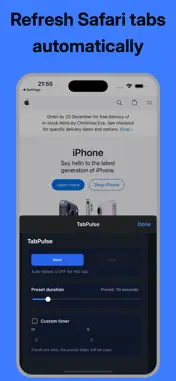
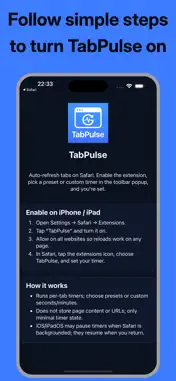
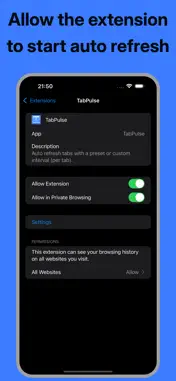
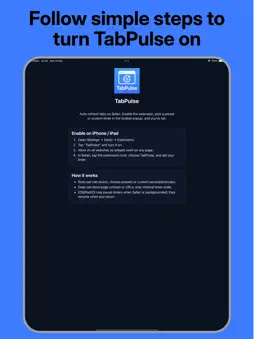
TabPulse is a fast, lightweight Safari extension that automatically refreshes tabs on a schedule. Perfect for live dashboards, monitoring pages, admin panels, queues, trading/price boards, sports scores, and development workflows—anywhere you want Safari to stay up to date without manual refresh. Set a timer per tab, choose a preset interval, or enter a custom time. Turn it on for one tab, a few tabs, or however you work—each tab runs independently. Key features: - Per‑tab auto refresh (each tab can have its own timer) - Quick preset intervals plus custom minutes/seconds - Simple Start/Stop controls with a clear status line - Options page to set your default timer values - Works on Safari for iPhone, iPad, and Mac Great for: - Analytics dashboards and reporting pages - Status pages and incident dashboards - Admin tools, moderation queues, and back‑office panels - Ticketing systems, inbox/queue views, and job monitors - Web development, QA, and testing periodic reload scenarios Permissions & privacy (important): TabPulse requests access to browser tabs so it can manage per‑tab timers and reload the correct tab. TabPulse does not read or modify webpage content, does not inject scripts into websites, and does not collect, track, or sell your data. Your timer preferences are stored locally on your device so the extension can remember your settings. How to enable: Install TabPulse. iPhone/iPad: Settings → Safari → Extensions → TabPulse → Allow. Mac: Safari → Settings → Extensions → TabPulse → Enable. Open Safari and tap/click the TabPulse toolbar button to start a timer for the current tab. Use of this app is subject to Apple’s Standard Licensed Application End User License Agreement (EULA), available in the App Store under “License Agreement” and at https://www.apple.com/legal/internet-services/itunes/dev/stdeula/
Technical Analysis
Package Overview Basic metadata
Bundle ID
com.zippyapps.TabPulse Current Version 1.0
Minimum iOS 15.0
Package Size App Store Size
Package Metadata 0 / 1 version records
Detailed binary, privacy manifest, framework, and Info.plist results have not been indexed for this package yet. The verified App Store and archive metadata above remains available.
Known Version Records
0 version records with stored package metadata • 1 known version records
Stored metadata does not guarantee a package is currently available to download.
| Details | Version / IDs | Version date | Action |
|---|---|---|---|
| Not archived | App Store ID: 880360659 | Unknown | Paid / Arcade |