Preview



Description
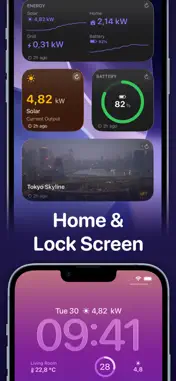
# Put any data on your Home Screen. Dashlet lets you build beautiful widgets from almost any online data source. Display weather, scenic webcams, Home Assistant sensors, RSS feeds, server dashboards, solar production, package tracking, satellite positions, and much more; all on your Home Screen, Lock Screen, and Apple Watch. No coding. No accounts. No cloud. # Connect almost anything • HTTPS endpoints • JSON, XML/RSS and images • Bearer tokens, Basic Authentication and custom headers • Secure Keychain storage # Build widgets visually Browse your response, pick the fields you want, and map them into widgets with an intuitive visual editor. No JSON paths or scripting required. # Share a setup in a link Send someone a data source, or a whole widget with its rows, formatting and theme, as a link. It opens filled in on their device, ready to save, and nothing is created until they keep it. Your tokens and passwords never travel with it. # Multiple widget types • Value • Dashboard • List • Image • Image + Text • Carousel • Charts and Gauges • Maps # Designed for power users Perfect for: • Home Assistant • Scenic webcams • Photo feeds • Weather • Solar monitoring • Server monitoring • RSS feeds • Package tracking • Satellite tracking • Smart homes • Personal dashboards # Always available Dashlet caches your latest data so widgets continue working even when you're offline. # Know when something changes View request history, response times, success rates and endpoint health to quickly diagnose problems. ---- Terms of Service: https://getdashlet.app/terms Privacy Policy: https://getdashlet.app/privacy Terms of Use (Apple Standard EULA): https://www.apple.com/legal/internet-services/itunes/dev/stdeula/
What's New
Version 1.9 2026-10-28
Dashlet on iPhone Duo, sharing from the editor, and a guide to placing your widgets. Made for iPhone Duo: Partly fold your iPhone Duo and Dashlet lays itself o... Technical Analysis
Package Overview Basic metadata
Bundle ID
dev.zigadolar.dashlet Current Version 1.9
Minimum iOS 18.0
Package Size App Store Size
Package Metadata 0 / 0 version records
Detailed binary, privacy manifest, framework, and Info.plist results have not been indexed for this package yet. The verified App Store and archive metadata above remains available.
Developer Information
Known Version Records
0 version records with stored package metadata
Stored metadata does not guarantee a package is currently available to download.
| Details | Version / IDs | Version date | Action |
|---|