
Preview






Description
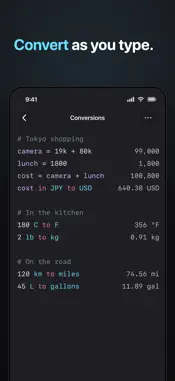
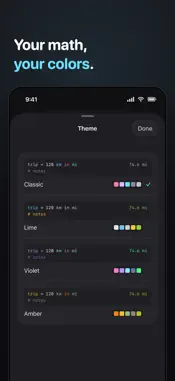
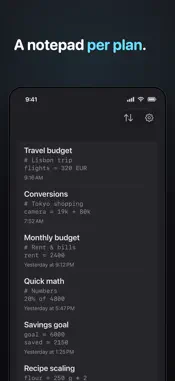
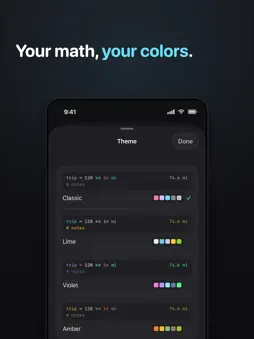
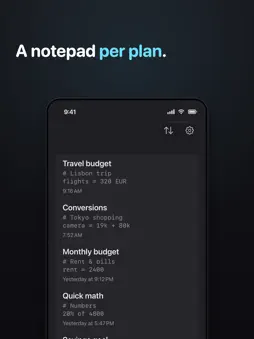
Numline is a calculator you type into like a notepad. Write your maths in plain words on the left, and answers appear instantly on the right. No buttons to hunt for. No equals key. Just type a line, like "120 USD to EUR", "20% of 4800" or "rent = 2400", and Numline works it out as you go. What you can do • Plain-language maths: write "95 EUR * 4" and read the answer beside it • Currencies: convert between world currencies, like "cost in JPY to USD". Rates update automatically; offline, the last ones stand in and results are approximate • Units: length, mass, volume, temperature and more, like "120 km to miles", "356 F to C" • Percentages: tips, discounts and splits in words, like "89 + 15%", "240 / 4 + 10%" • Variables: name a value once and reuse it, like "rate = 85", "32 * rate" • Totals: "total" sums the block above; a blank line starts a fresh one • Dates: "trip - today", "trip + 2 weeks" and other quick date maths • Functions: sqrt, round, abs and friends when you need them • Shorthand: "19k + 80k" reads thousands the way you say them • Themes: Classic, Lime, Violet and Amber, each colouring your notation its own way • Many notepads: keep a separate sheet for every plan, and search them by title or content Every line is live. Change a number and everything below it updates. It reads back like a note you wrote to yourself, so you can always see how you reached an answer. On the Mac, Numline opens on your last notepad, ready to type, with a menu bar and keyboard shortcuts. Each device keeps its own notepads. Numline stays quiet and focused: a dark editor, syntax colours you choose, and nothing in your way. No account. No subscription. No ads. Your notepads stay on your device. Just type.
What's New
Version 1.12 2026-11-14
• On the Mac, typing is faster and no longer lags in a long notepad • On the Mac, dragging text within a notepad moves it without losing any, and one ⌘Z puts it...• On the Mac, typing is faster and no longer lags in a long notepad • On the Mac, dragging text within a notepad moves it without losing any, and one ⌘Z puts it back • Text dropped below a notepad's last line goes on a new line • On iPad with another app beside Numline, Numline no longer takes the keyboard from the app you're typing in • On iPad with another app beside Numline and a keyboard attached, clicking in a notepad no longer blanks the page • On iPad, the symbol rail no longer bounces when you reattach a keyboard • Escape closes the Delete and Clear confirmations and sheets every time • On iPad, the notepad list always shows its search field, and Find Notepads types into it • On iPad, resizing a window between one and two columns keeps the keyboard up • On iPhone, search results in the notepad list are no longer hidden behind the keyboard Technical Analysis
Package Overview Basic metadata
Bundle ID
onedecadestudio.numline Current Version 1.12
Minimum iOS 18.0
Package Size App Store Size
Package Metadata 0 / 0 version records
Detailed binary, privacy manifest, framework, and Info.plist results have not been indexed for this package yet. The verified App Store and archive metadata above remains available.
Known Version Records
0 version records with stored package metadata
Stored metadata does not guarantee a package is currently available to download.
| Details | Version / IDs | Version date | Action |
|---|