
Preview








Description
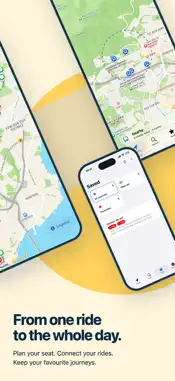
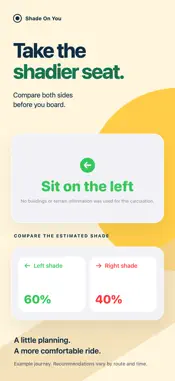
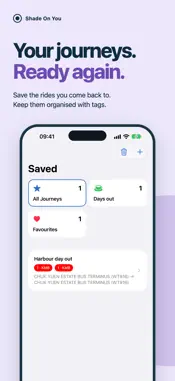
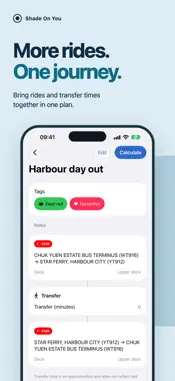
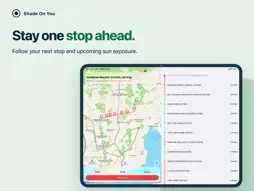
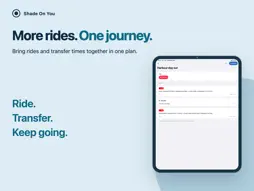
Shade On You helps you choose the more comfortable side to sit on Hong Kong buses, green minibuses and trams. Search for stops, browse routes and plan your journey, then compare the estimated direct sunlight on the left and right sides. Whether you want to avoid the hot afternoon sun or prefer the sunnier side, recommendations follow your preference. Buses, green minibuses and trams Browse routes, choose your boarding and alighting stops, and view a map or stop list. Sunlight and shade along the way Calculations combine the sun’s position, route geometry, and Hong Kong’s 3D building and terrain data. At observation points along the route, the app checks whether buildings or terrain block incoming sunlight, then estimates direct sunlight on each side. Choose your departure time and your preferred upper or lower deck for buses. Green minibuses use the lower-deck observation height. Results show the selected deck, a side comparison, and a sunlight exposure map using colours and line styles. Arrival predictions, weather and journey guidance See upcoming arrivals on supported routes. Scheduled services are labelled when the provider explicitly supplies that information. Weather and UV information are also shown when available. Arrival predictions are not yet available for trams. Once you start a journey, follow your progress along the route and upcoming changes in sunlight. Planning does not require location permission; live journey tracking needs location data along the selected route. Saved journeys and widgets Save single-ride or multi-ride journeys, give them names, and organise them with personalised tags. Add Home Screen widgets for quick access. Tap a saved journey to calculate it for the current time using your default preferences. Plan from your wrist Search routes, access synced saved journeys, and calculate seating recommendations on Apple Watch. Sync calculation data packs from your iPhone for on-watch calculations. View route details as a map or stop list, and check upcoming arrivals on supported routes. Requires watchOS 26 or later and a paired iPhone running iOS 26 or later. Find the Sun’s position See the Sun’s direction and elevation in the Solar position screen on Apple Watch. Solar position widgets on the iPhone Lock Screen and watch face complications provide readings at a glance. These readings use the latest available location and refresh periodically. Explore Hong Kong and use offline data If a valid Hong Kong location is unavailable, explore routes on a territory-wide stop map with grouped markers. Download regional calculation data to use it offline. Download sizes are shown and confirmation is requested before downloading. After checking for updates, you decide when to install them. Maps, live arrival predictions and weather may require an internet connection. The interface supports English, Traditional Chinese, Simplified Chinese, French, Japanese and Korean. iOS 18 has limited support: feature updates and bug fixes may arrive later or less often than on newer versions. Sunlight and shade results are estimates and do not guarantee shade or UV protection. Vehicle design, time, weather, data age, temporary obstructions and other environmental factors can affect actual conditions.
What's New
Version 2026.11.0 2026-10-31
2026.11.0 brings Shade On You to Apple Watch, adds solar position widgets and complications, and gives you more ways to personalise saved journeys. Shade On Yo...2026.11.0 brings Shade On You to Apple Watch, adds solar position widgets and complications, and gives you more ways to personalise saved journeys. Shade On You on Apple Watch • Search bus, green minibus and tram routes from your wrist. • Plan a ride or use a saved single-ride or multi-ride journey synced from your iPhone. • Calculate seating recommendations on your Watch using synced data packs. • Check upcoming arrivals on supported routes and explore sunlight and shade in the route map or stop list. Solar position at a glance • Use the Solar position screen on Apple Watch to see the Sun’s direction and elevation. • Add solar position widgets to your iPhone Lock Screen or complications to your watch face. Make saved journeys your own • Personalise tags with more symbols and custom colours. • Manage tags and delete saved journeys from the updated Saved menu. Improvements and fixes • Improved recovery of interrupted data pack installations and cleanup of unused files. • Fixed interface and appearance issues. The Apple Watch app requires watchOS 26 or later, paired with an iPhone running iOS 26 or later. Technical Analysis
Package Overview Basic metadata
Bundle ID
com.jacobshing.proj-canicule Current Version 2026.11.0
Minimum iOS 18.0
Package Size App Store Size
Package Metadata 0 / 0 version records
Detailed binary, privacy manifest, framework, and Info.plist results have not been indexed for this package yet. The verified App Store and archive metadata above remains available.
Known Version Records
0 version records with stored package metadata
Stored metadata does not guarantee a package is currently available to download.
| Details | Version / IDs | Version date | Action |
|---|