
Preview




Description
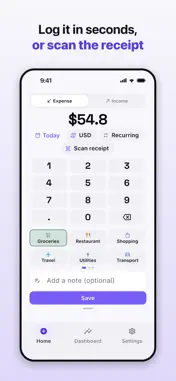
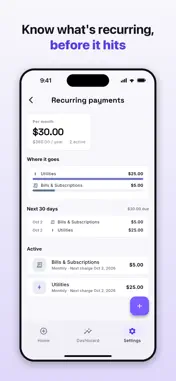
SpendSteps is a beautifully simple expense tracker that keeps every number on your device. Log spending in seconds, ask where your money went in plain language, and stay ahead of your budget. WHY SPENDSTEPS - Private by design. Your data lives on your phone — including the AI that answers your questions. There's no login and no cloud account required to get started. - Fast to log. Quick-add an expense or income in a couple of taps, with an optional note. - Made to look at. A clean, calm interface with light and dark themes. LOG WITHOUT LIFTING A FINGER - Auto-log Apple Pay: a one-time Shortcuts setup logs every Apple Pay purchase silently, with a guided walkthrough in the app. - New Apple Pay cards are added as accounts automatically, and gas-pump holds are flagged so you can enter the final amount. - SpendSteps learns your merchants — file a purchase once and future ones are categorized for you. - Glance at your recent entries right from the record screen to confirm a save or undo a mistake. ON YOUR WRIST AND HOME SCREEN - Apple Watch: see this month's spending and your budget at a glance, and log a spend with the Digital Crown. - Add SpendSteps to your watch face to log or check your budget in one tap. - Home Screen widgets show your spending and budgets, and let you log without opening the app. TRACK EVERY PURCHASE - Scan receipts with your camera or photo library and attach them to a transaction — in any of the app's supported languages. - Multi-currency support with live or cached exchange rates, converted to your base currency. Change your base currency any time and convert your existing amounts. - Browse transactions as a list or on a calendar, and search or filter instantly. - Split one purchase across several categories. KEEP YOUR ACCOUNTS STRAIGHT - Create accounts for your cash, cards, and bank accounts, and manage them in Settings. - Pick an account on every transaction, right where you log it. - See an account breakdown in Insights to know which one your money flows through. BUDGETS & INSIGHTS - Set monthly spending limits by category and see how much is left at a glance. - Get an alert when a budget is almost used up, and when you go over. - Spot trends with weekly, monthly, and yearly charts for spending and income. - Get a monthly recap on the 1st of each month. JUST ASK - Ask about your spending in plain language — "what did I spend most on?", "how does this month compare to last month?", "what was my biggest purchase this year?" - Every answer comes with the chart or list behind it, so you can check the figures. - Answers are worked out on your iPhone: your questions and transactions never leave it, and nothing trains on them. - Requires Apple Intelligence (iPhone 15 Pro or later); hidden where it can't run. NEVER MISS A BILL - Log recurring payments, from subscriptions to bills, automatically. - Get a reminder before each bill or subscription is due. - Choose weekly, biweekly, monthly, or yearly, pause any time, and always know your next charge. ORGANIZE YOUR WAY - Customize categories with your own names, colors, and icons. - Start fast with a built-in set: Snack & Drink, Groceries, Transport, Shopping, Bills & Subscriptions, and more. YOUR DATA, YOUR CONTROL - Lock the app with Face ID or your passcode. - Export all transactions to CSV, edit in a spreadsheet, and import them back — re-importing the same file never creates duplicates. - Share any month as a PDF report, for a partner, an accountant, or your records. - Available in English, Simplified Chinese, Traditional Chinese, Japanese, Korean, Spanish, French, German, Italian, Portuguese, Hindi, Indonesian, Vietnamese, and Arabic. SpendSteps is a fast, private way to know exactly where your money goes. Download SpendSteps and take control of your spending today.
What's New
Version 1.1.11 2026-10-31
Thank you for using SpendSteps and for all your feedback. It shapes every update. • Cleaner layouts in every language • Bug fixes and stability improvements Technical Analysis
Package Overview Basic metadata
Bundle ID
com.zestworks.spendtrail Current Version 1.1.11
Minimum iOS 17.0
Package Size App Store Size
Package Metadata 0 / 0 version records
Detailed binary, privacy manifest, framework, and Info.plist results have not been indexed for this package yet. The verified App Store and archive metadata above remains available.
Developer Information
Known Version Records
0 version records with stored package metadata
Stored metadata does not guarantee a package is currently available to download.
| Details | Version / IDs | Version date | Action |
|---|