
Preview


Description
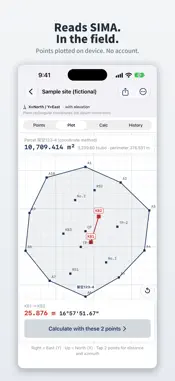
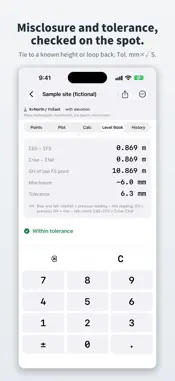
Read SIMA files, compute coordinates on site, and write them back — entirely on your iPhone. A coordinate calculator built for field surveying in Japan. ■ SIMA (survey data exchange format) support Import SIMA files received via AirDrop or the Files app. After an import you see how many points, parcels, duplicate names and unreadable lines came in, and the plot draws each parcel with its area (coordinate method). Tap two points to see the distance and bearing. Unreadable lines never stop the import: a report tells you which lines were skipped and why, and unrecognized records are preserved verbatim and written back in place on export. ■ Seven field calculations Inverse (distance, bearing, height difference), radiation, open/closed traverse with closure error and compass-rule adjustment, intersection, area (coordinate method), offset stakes, and perpendicular foot. Register any result as a new point with one tap. ■ Level book (rise and fall) Each site has a Level Book tab for rise-and-fall levelling. Enter the start height and BS, FS and IFS readings to get the ground height (GH) of each station and the ΣBS − ΣFS = Σrise − Σfall check. When you go back to the start or tie to a known height, it shows the misclosure and whether it is within tolerance, using distance S and the coefficient you enter (mm×√S). Enter a design level to see cut or fill at each station. Level book entry and calculations are free, and level book rows do not count toward points (CSV export of a level book is part of Pro). ■ Input built for the field A large keypad, one-tap switching between DD.MMSS and decimal degrees, intuitive negative coordinates, and high-contrast display for outdoor readability. ■ Designed so data survives Atomic saves with three generations of automatic backups. If a save ever fails you are told immediately and can retry. The app itself connects only to the App Store (for purchases, restores and the like); your data is never sent to our servers. ■ No subscription All calculations, the plot and SIMA import are free. From version 1.2, points brought in from SIMA files or CSV paste do not count toward the 50 free points — points you enter by hand or register from a calculation count; SIMA and CSV imports and the bundled sample do not. Sokuten Pro (one-time purchase — see the App Store listing for current pricing) unlocks unlimited new points, SIMA/CSV export, bulk copy of all points, and unlimited history (the free version shows the last 7 days of history). Note: Verify results before relying on them. For public survey or registration deliverables, follow the Survey Act and your client's specifications.
What's New
Version 1.3.1 2026-11-05
Swiping left to delete a site or a point now asks you to confirm first, and for a site it shows how many points, calculation history entries and level books it ...Swiping left to delete a site or a point now asks you to confirm first, and for a site it shows how many points, calculation history entries and level books it has. Values and traverse legs you enter on a calculation screen now stay when you go back, while the app is open. When you reopen the screen, it tells you your previous input was restored, and Clear all input removes it. The Angle format setting now also sets the starting format for angle input in calculations, and Use last value on a long press converts the value to the field's current format. Technical Analysis
Package Overview Basic metadata
Bundle ID
com.yuya.sokuten Current Version 1.3.1
Minimum iOS 17.0
Package Size App Store Size
Package Metadata 0 / 0 version records
Detailed binary, privacy manifest, framework, and Info.plist results have not been indexed for this package yet. The verified App Store and archive metadata above remains available.
Developer Information
Known Version Records
0 version records with stored package metadata
Stored metadata does not guarantee a package is currently available to download.
| Details | Version / IDs | Version date | Action |
|---|