
Preview




Description
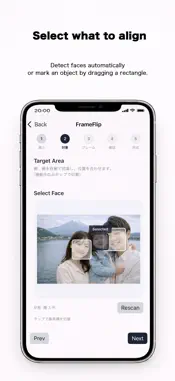
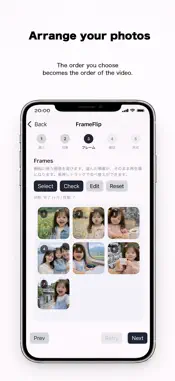
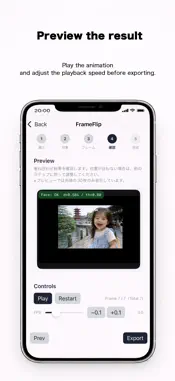
---------------- FrameFlip ---------------- Align photos. Change over time FrameFlip automatically aligns multiple photos to a single reference image and exports the result as a short MP4 video. By using a person’s face or a selected part of an object as the reference, photos are aligned to the same position and scale, making changes over time easy to see. This makes FrameFlip suitable for growth records, travel memories, and visualizing creative processes. -------------- Key Features -------------- ■ Automatic face and object alignment When using Face mode, faces are detected automatically. When using Object mode, simply drag to select the reference area. No complex settings are required. The app handles alignment automatically. ■ Simple, step-by-step workflow Just choose a reference image and select the frame images. The guided interface makes it easy to use, even for first-time users. ■ Preview before exporting Check the alignment result in the preview first. If everything looks good, export it as an MP4 video. ■ Videos ready for Photos and social apps Exported videos can be saved directly to the Photos app, or shared easily with social and messaging apps. ■ No account required No account registration or login is needed. You can start using the app right after installing it. --------------- How to Use --------------- 1. Select one reference photo 2. Choose a face or object as the target 3. Select multiple frame photos 4. Preview and export the video ■ Recommended Uses - Create a growth record from photos taken over time - Visualize changes during a trip - Show the progress of artwork or creative projects - Record changes or assembly of objects ------------ Privacy & Terms ------------ ■ Privacy With FrameFlip, all photo processing and video generation are performed entirely on your device. Selected photos and generated videos are never sent to external servers. Privacy Policy: https://www.atlascope.idatabase.info/app/en/privacy.html ■ Free Version and Pro FrameFlip (Free) provides access to the basic features. FrameFlip Pro offers additional features, including ad removal, unlimited exports, and high-quality video export options. Please refer to the Terms of Use below for the conditions applicable to both the free version and FrameFlip Pro. Terms of Use: https://www.atlascope.idatabase.info/app/en/terms.html -------------------------------------------- Just line up your photos, and see time take shape. Tell a new story with your photos using FrameFlip.
What's New
Version 2.1 2026-06-21
Fixed a bug. Technical Analysis
Package Overview Basic metadata
Bundle ID
jp.app.FrameFlip Current Version 2.1
Minimum iOS 18.2
Package Size App Store Size
Package Metadata 1 / 8 version records
Detailed binary, privacy manifest, framework, and Info.plist results have not been indexed for this package yet. The verified App Store and archive metadata above remains available.
Developer Information
Known Version Records
1 version record with stored package metadata • 8 known version records
Stored metadata does not guarantee a package is currently available to download.
| Details | Version / IDs | Version date | Action |
|---|---|---|---|
| 7.48 MB | v2.1 App Store ID: 887243178Build: 2.1 | 2026-06-21 20:37:14 | Get Version |
| Not archived | App Store ID: 884899765 | Unknown | Request Version |
| Not archived | App Store ID: 883616464 | Unknown | Request Version |
| Not archived | App Store ID: 882767118 | Unknown | Request Version |
| Not archived | App Store ID: 882742565 | Unknown | Request Version |
| Not archived | App Store ID: 882691741 | Unknown | Request Version |
| Not archived | App Store ID: 881787691 | Unknown | Request Version |
| Not archived | App Store ID: 881101622 | Unknown | Request Version |