
Preview



Description
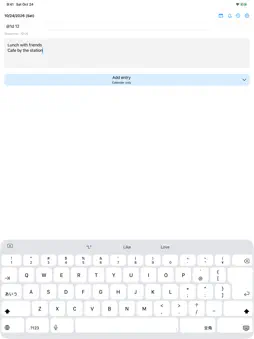
Turn a quick thought into a calendar event with Yotei. Enter a date and time, write the event, and add it to your calendar. Use short hours such as 9 or 12, compact times such as 930, or relative dates such as @1d and @1w. A preview shows the resolved date and time before you save. Leave the time blank for an all-day event. • Choose a writable calendar and remember your last selection. • Set an alert and a second alert, with separate remembered choices for timed and all-day events. • Add to Calendar only or create a Calendar event and a Reminder. • Reuse recent event text through suggestions. • Browse up to 300 events added through Yotei and open Calendar to edit them. Removing history does not delete calendar events. • Use Japanese or English, with matching date formats. On Mac, Yotei stays in the menu bar. Press Control+Option+Space to open the entry panel. Press Control+Command+M while editing the body to add the entry. The Apple Watch companion sends entries through your paired iPhone. Open Yotei on iPhone and allow Calendar access first; saving from Watch requires the iPhone to be reachable. No account, ads, or analytics. Calendar and Reminders access is used for the features you select.
Technical Analysis
Package Overview Basic metadata
Bundle ID
me.tacogips.yotei Current Version 0.1.0
Minimum iOS 17.0
Package Size App Store Size
Package Metadata 0 / 0 version records
Detailed binary, privacy manifest, framework, and Info.plist results have not been indexed for this package yet. The verified App Store and archive metadata above remains available.
Developer Information
Known Version Records
0 version records with stored package metadata
Stored metadata does not guarantee a package is currently available to download.
| Details | Version / IDs | Version date | Action |
|---|