
Preview




Description
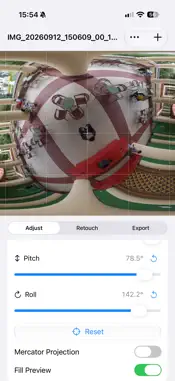
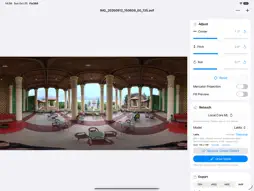
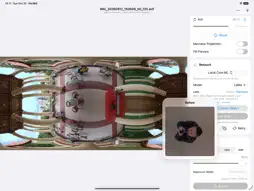
Fix360 lets you adjust and retouch 2:1 equirectangular 360° panorama images on your iPhone or iPad. Open a panorama from Photos or Files, drag to recenter the view, and fine-tune center, pitch, and roll. Remove unwanted objects, then export the corrected image at its original pixel dimensions or at a reduced size. Fix360 preserves the source color profile where available and supports common export formats. With local repair methods, remove unwanted objects using automatic selection or the Draw Mask tool. Automatic selection finds the object at the center of the view and opens an editable mask with an adjusted viewing angle. Review the selection, paint additional areas, or switch to Erase to refine the mask. Adjust the brush size and viewing angle using the on-screen controls. Use the smallest viewing angle that fits the object for sharper results. Touch controls make panorama adjustments straightforward: drag to change center and pitch, or rotate with two fingers to adjust roll. Precise sliders and individual reset controls help you fine-tune the result. An external keyboard also supports shortcuts for repeated adjustments. Features: • Open panoramas from Photos or Files in a wide range of image formats • Recenter 360° panoramas interactively by dragging • Adjust center, pitch, and roll with precise controls • Rotate with two fingers to adjust roll • Keyboard shortcuts for fine adjustment with an external keyboard • Reset adjustments instantly • Optional Mercator projection mode • Automatic selection of the object at the center of the view • Review and refine automatic selections before removal • Draw Mask tool with adjustable brush size and Paint / Erase controls • Draw masks with touch or Apple Pencil on compatible iPads • Change the viewing angle while editing the mask • Local texture repair • AI-powered object removal using downloadable LaMa and Stable Diffusion models • Downloaded AI models run locally on your device • Guide object removal with custom text prompts in supported AI models • Use negative prompts to describe what supported local AI models should avoid • Edit with Apple Image Playground on devices where Apple Intelligence image generation is available • Choose the viewing angle before sending an image to Apple Image Playground • Retry the last removal with a different model using the same selection • Undo brush strokes and completed removals • Export at original image dimensions or choose a maximum export width • Export as TIFF, JPEG, HEIC, or AVIF, depending on device support • Quality control for compressed export formats • TIFF compression options: ZIP, LZW, PackBits, and None • Share exported images, save them to Files, or save supported formats to Photos • Uses the source image color space and embedded ICC profile when available • Native interface with adaptive layouts and HDR-aware preview rendering • Adaptive layouts for iPhone and iPad, including support for folded and unfolded views on iPhone Duo Local AI models have different memory requirements. Large panoramas and diffusion models require sufficient device memory. The free version includes five exports per day. A one-time Full Version purchase unlocks unlimited exports. Fix360 is designed for photographers, virtual tour creators, 3D artists, and anyone working with 360-degree panoramic images who needs a focused tool for correcting orientation and removing unwanted objects before publishing or editing elsewhere.
Technical Analysis
Package Overview Basic metadata
Bundle ID
com.yurygolubinsky.Fix360ios Current Version 1.0
Minimum iOS 27.0
Package Size App Store Size
Package Metadata 0 / 0 version records
Detailed binary, privacy manifest, framework, and Info.plist results have not been indexed for this package yet. The verified App Store and archive metadata above remains available.
Developer Information
Known Version Records
0 version records with stored package metadata
Stored metadata does not guarantee a package is currently available to download.
| Details | Version / IDs | Version date | Action |
|---|