
Preview



Description
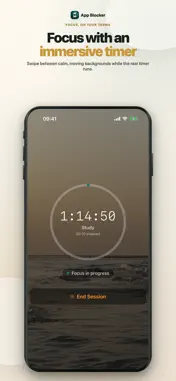
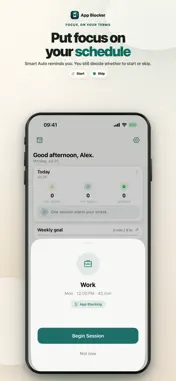
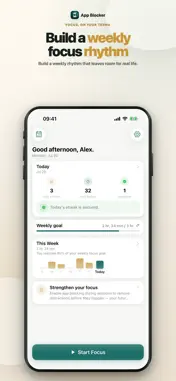
App Blocker: Screen Time — Focus is easier when distractions are out of reach. App Blocker combines a flexible focus timer with real app blocking, so your chosen apps and categories stay unavailable while you work, study, read, create, or take time for yourself. BLOCK DISTRACTING APPS Choose the apps and categories that pull you away. App Blocker uses Apple's Screen Time permissions to shield them during an active focus session, then restores access when the session ends. START WITH A CLEAR GOAL Write down what you want to finish, choose a session length, and begin. Pick Quick, Deep, Extended, or Open mode depending on the time and attention you have available. MAKE FOCUS FEEL BETTER Settle into an immersive timer with ocean, beach, forest, mountains, campfire, rain, or a clean minimal background. Keep the session visible through Live Activities and supported widgets. PUT FOCUS ON YOUR SCHEDULE Create recurring Smart Auto routines for the moments you want to protect. When a scheduled session is due, App Blocker asks you to Start or Skip, so you stay in control. TRACK REAL PROGRESS Review focused time, weekly goals, streaks, and session history. Completed, ended-early, and skipped sessions are recorded honestly, helping you see the routine you are actually building. BUILT FOR DAILY FOCUS • App and category blocking during active sessions • Flexible goal-led focus timer • Quick, Deep, Extended, and Open modes • Immersive animated backgrounds • Recurring Smart Auto schedules • Weekly goals, streaks, and history • Live Activities, Dynamic Island, and widgets • Calm design without a cluttered dashboard App blocking requires Screen Time authorization and only applies after you select what App Blocker should block. One full 15-minute focus session is free. No purchase or subscription trial is required for this session. Continued focus sessions and Smart Auto require a subscription or a one-time lifetime purchase. Existing lifetime owners keep access. Prices and any eligible annual trial are shown before purchase. Subscriptions renew automatically unless cancelled and can be managed in your Apple Account settings. Terms of Use (EULA): https://www.apple.com/legal/internet-services/itunes/dev/stdeula/
What's New
Version 1.5.3 2026-10-28
Clearer guidance for your first focus session, with an easier-to-review focus plan and completion summary. Improved layouts for larger text. Technical Analysis
Package Overview Basic metadata
Bundle ID
app.qadry.ios Current Version 1.5.3
Minimum iOS 17.6
Package Size App Store Size
Package Metadata 0 / 1 version records
Detailed binary, privacy manifest, framework, and Info.plist results have not been indexed for this package yet. The verified App Store and archive metadata above remains available.
Developer Information
Known Version Records
0 version records with stored package metadata • 1 known version records
Stored metadata does not guarantee a package is currently available to download.
| Details | Version / IDs | Version date | Action |
|---|---|---|---|
| Not archived | App Store ID: 882039809 | Unknown | Request Version |