Preview







Description
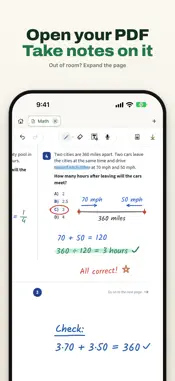
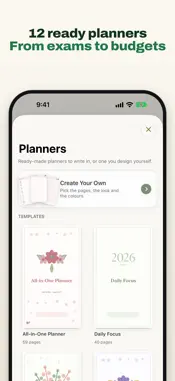
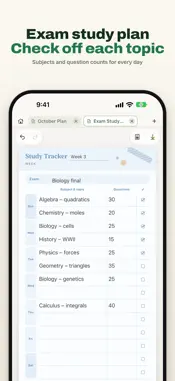
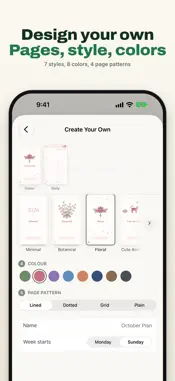
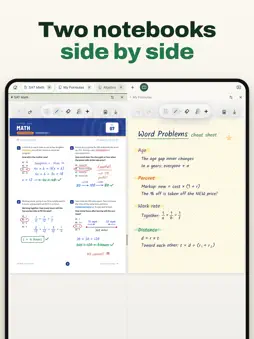
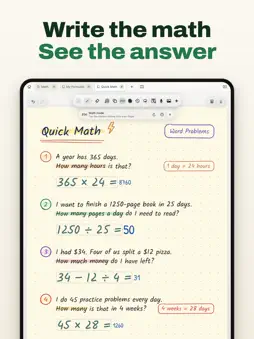
Take handwritten notes, annotate PDFs, and turn lecture recordings into text on your iPhone and iPad. Start without creating an account. • Math mode: Write 2(3+4)= with your finger on iPhone or Apple Pencil on iPad, and we'll handle the rest. Tap the green line with your finger, then Solve: 14 lands beside the = in your own ink. Something misread? Edit what we picked up. • Beautify while writing: Lines you scrawl in a lecture turn clean and readable as you write. Pick one of 19 handwriting styles or a neater version of your own. • Cramped PDFs are no problem in VelNotes: Widen the page or add workspace beside it, so every note, solution, and sketch fits. ONE APP FOR IPHONE AND IPAD • On iPhone, write with your finger or type on Phone screen pages that fit without zooming • On iPad, write with Apple Pencil or turn on Finger Writing Mode • Planners on iPhone: start from 12 templates or make your own, with the dates already on the pages. Tap a line to type, a checkbox to check it off • Two notebooks side by side on iPad, each with its own toolbar • Video window on iPad: watch a lesson video beside your notes WRITE YOUR WAY • Write and highlight naturally; Snap to Straight Line and Hold for a straight line keep lines neat • Type text, draw shapes, and use a ruler, brushes, labels, and sticky notes, plus a laser pointer on iPad • Capture typed notes fast with Quick Text, then save them as a notebook • Move or resize selected handwriting, convert it to text, or scribble over strokes to erase • Choose paper styles, custom colors, daily and weekly layouts, 360 stickers, and colorful folders WORK WITH PDFS AND MEDIA • Import PDFs, including password-protected ones; PDFs over 300 pages import in parts • Write, draw, and place text, photos, scans, stickers, and shapes over PDF pages • Add GIFs, keep notebooks open in tabs, and choose A4, Letter, or custom page sizes • Add images from Photos, Camera, or the built-in document scanner • Export notebooks as PDF or images with multiple quality options RECORD AND TRANSCRIBE • Record lectures, meetings, and ideas; if the app closes mid-recording, your audio is kept • Create on-device transcripts in the spoken language you pick, when supported by the device, system, and language • Import local audio or video and turn speech into notebook text with Pro REPLAY AND CREATE • Replay how a page was written and drawn with Time Travel, and export it as a 9:16 or 16:9 video • Turn photos into cutout stickers locally with Sticker Studio PRIVATE BY DESIGN • Notebooks are stored on this device first • When iCloud Drive is available, notebook sync across your iPhone and iPad and an automatic private safety backup are on by default; restore an earlier copy, turn either off, or export your data at any time • VelNotes does not upload your notebooks or raw recordings to a VelNotes server FREE AND PRO Free includes up to 3 notebooks at a time, plus 3 planners on iPhone (synced and trashed ones count; delete one for good to start a new one), recordings of up to 15 minutes per session, and one free use of live transcription. Time Travel video export is free and unlimited for everyone. Weekly, monthly, and yearly Pro plans and a one-time lifetime purchase unlock the same features: unlimited notebooks (and planners on iPhone), local audio/video import for on-device transcription, longer recordings, and unlimited live transcription on supported devices. One Pro covers your iPhone and iPad with the same Apple Account. Transcription and handwriting recognition can contain errors and depend on device, operating-system, and language support. Math mode works with numbers only: no variables, unknowns, or equations to solve. The app interface is available in English, Turkish, German, Spanish, and French; other device languages use English. Privacy Policy: https://velnotes.com/privacy/en Terms of Use: https://www.apple.com/legal/internet-services/itunes/dev/stdeula/
What's New
Version 2.2.0 2026-11-08
VelNotes is now on iPhone too: your notebooks in your pocket, in sync with your iPad. • VelNotes on iPhone: write with your finger or type, mark up PDFs, recor... Technical Analysis
Package Overview Basic metadata
Bundle ID
com.yunusislegel.Velnotes Current Version 2.2.0
Minimum iOS 17.6
Package Size App Store Size
Package Metadata 0 / 3 version records
Detailed binary, privacy manifest, framework, and Info.plist results have not been indexed for this package yet. The verified App Store and archive metadata above remains available.
Developer Information
Known Version Records
0 version records with stored package metadata • 3 known version records
Stored metadata does not guarantee a package is currently available to download.
| Details | Version / IDs | Version date | Action |
|---|---|---|---|
| Not archived | App Store ID: 886104199 | Unknown | Request Version |
| Not archived | App Store ID: 885136591 | Unknown | Request Version |
| Not archived | App Store ID: 884760982 | Unknown | Request Version |