Preview






Description
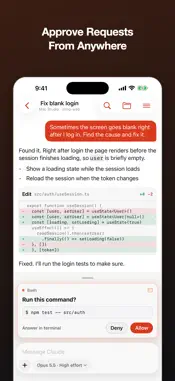
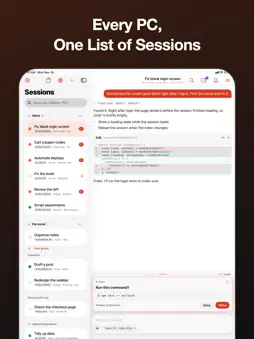
Step away from your desk and keep your coding sessions moving. See when a session finishes or needs you, and answer from your iPhone. Bridge Code lets you watch, answer and start Claude Code sessions that run on your own Mac and Windows PCs. The sessions keep running on your computers; your iPhone directs them. ● Sessions keep going while you're away — get notified when one finishes or waits for a permission or an answer, and mute the ones you don't need to hear from ● Answer permission requests from your phone — allow or deny, pick an answer, approve a plan, all with one tap on a card ● Just say it — tap the mic and your PC's Claude turns what you said into a clean prompt, with developer terms spelled right. Edit or undo it before sending ● Every PC in one list — sessions from your home PC, work Mac and laptop, grouped by computer ● Work on a session together — share it with another Bridge Code account with read or write access. Sessions shared with you get their own group (Pro) ● Start new sessions on the go — pick a PC and a folder and hand off the task ● Review changes where you are — diffs, file previews, and photos or files attached to a message ● Terminal and screen inside the session — switch between chat, terminal and the PC's screen, and send commands from the chat to a shell panel under the session. Control the screen with your fingers ● Open the web app you're building — load a dev server running on your PC (an open port) right inside the app Your devices connect directly Code, conversations, files, terminal output and screen content travel between your own devices with end-to-end encryption. When a direct connection isn't possible, the relay only passes encrypted data along. Your voice is turned into text on the device itself. No ads, no tracking. What you need • The Bridge Code app on each Mac or Windows PC that runs sessions (free download at bridge-code.com) • A Bridge Code account with remote access (Pro) — sign in with Apple, Google or email, then request Pro at bridge-code.com • Claude Code installed and signed in on those PCs Works with Claude Code. Claude and Claude Code are trademarks of Anthropic. Bridge Code is not affiliated with or endorsed by Anthropic. Privacy Policy: https://bridge-code.com/privacy Terms of Use: https://bridge-code.com/terms
What's New
Version 1.29.0 2026-11-16
• Share a session with another Bridge Code account (read or write). Sessions shared with you show under "Shared with me" (Pro) • Speak instead of typing: your P...• Share a session with another Bridge Code account (read or write). Sessions shared with you show under "Shared with me" (Pro) • Speak instead of typing: your PC's Claude turns it into a clean prompt in the composer. Edit or undo before sending • See the PC's screen inside the session (≡ menu › View as screen) • Open a shell panel under the session and send chat commands to it with Insert in shell • Mute notifications per session • New features need Bridge Code 1.29.0 on the PC Technical Analysis
Package Overview Basic metadata
Bundle ID
com.aside.bridge Current Version 1.29.0
Minimum iOS 17.0
Package Size App Store Size
Package Metadata 0 / 0 version records
Detailed binary, privacy manifest, framework, and Info.plist results have not been indexed for this package yet. The verified App Store and archive metadata above remains available.
Known Version Records
0 version records with stored package metadata
Stored metadata does not guarantee a package is currently available to download.
| Details | Version / IDs | Version date | Action |
|---|