
Preview



Description
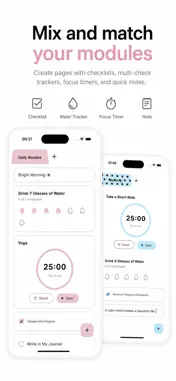
Morning routines, night routines, daily cleaning, monthly home care, study sessions, and everything in between. Not every routine follows the same schedule or needs the same tools. Flagly is a modular routine planner that lets you separate different parts of your life into visual flag pages and build each page with the modules you actually need. Do not force your life into a fixed template. Choose what works for you and create your own routine system. KEY FEATURES • Multiple flag pages Create separate pages for different areas of your life, goals, or repeating schedules. • Modular routine building Mix checklists, Multi Check trackers, timers, and notes on the same page. • Multi Check Track goals that need to be completed multiple times, such as drinking water, stretching, or daily repetitions. • Checklists Quickly add tasks and check them off as you complete them. • Focus timers Set your own duration for studying, working, cleaning, or focused routine sessions. • Quick notes Keep instructions, reminders, preparation lists, and short thoughts directly beside your routine. • Automatic resets Reset check states and timers automatically every day, week, month, or two months. • Custom reset notifications Write your own notification message for scheduled routine resets. • Visual customization Personalize flag colors, page colors, photo backgrounds, flag names, and text colors. HAVE AN IDEA FOR A NEW MODULE? Flagly is open to new ideas and feature suggestions.
Technical Analysis
Package Overview Basic metadata
Bundle ID
com.example.flagnoteApp Current Version 1.0
Minimum iOS 13.0
Package Size App Store Size
Package Metadata 0 / 0 version records
Detailed binary, privacy manifest, framework, and Info.plist results have not been indexed for this package yet. The verified App Store and archive metadata above remains available.
Known Version Records
0 version records with stored package metadata
Stored metadata does not guarantee a package is currently available to download.
| Details | Version / IDs | Version date | Action |
|---|