
Preview







Description
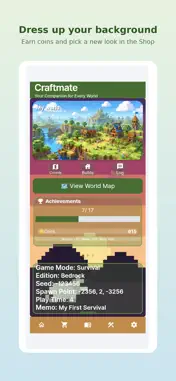
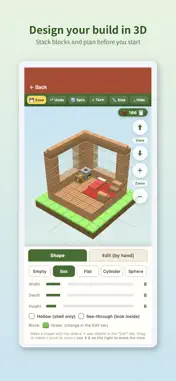
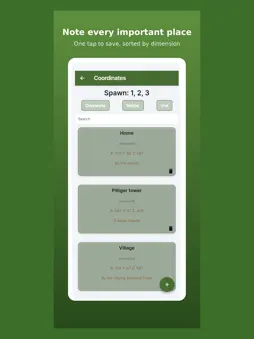
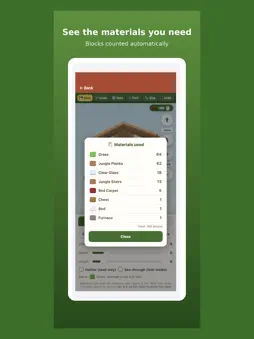
CraftMate is an adventure companion for block-building games. Keep your coordinates, build blueprints, and play logs together for each world you play. Simple enough for kids, handy for adults. ■ World Map Enter a seed and see the terrain and biomes in colour. Slime chunks work on both Bedrock and Java, and you can lay the Nether's coordinates over the map. Your saved coordinates appear as pins, with build photos attached and the distance from spawn at a glance. Please note: structures such as villages and strongholds are not shown. ■ 3D Blueprint Builder Design your builds in 3D before you start. - 500+ blocks to choose from, searchable by name - Make boxes, cylinders, and spheres with sliders - Place blocks by hand, including stairs, doors, beds, redstone, and glazed terracotta - Hide layers from the top, the right or the back to work inside a build - View one layer at a time as a flat plan, then just stack it the same way - See the size and a list of every material you need ■ Build Ideas Guides for what to build next. Each idea lists the blocks you need and shows a photo for every step, so beginners can follow along. ■ Guides Look up mobs, blocks, items, biomes, enchantments, and more, including what the newest game updates added. ■ Coordinates Save your base, villages, and resource spots in one tap, sorted by Overworld, Nether, and End. ■ Tools Convert Nether coordinates and work out chunks. ■ Adventure log Write down what happened on each day of your adventure. ■ World management Add all your worlds and switch between them. Everything you save stays with its world. ■ Fun extras Earn coins with daily login bonuses and achievements, and use them on new backgrounds and stickers. Coins can't be bought with real money. ■ Japanese / English Switch the display language anytime in Settings. Your data is saved to your account in the cloud, so you can pick up where you left off on a new phone. CraftMate is an unofficial app. It is not affiliated with, approved by, or endorsed by Mojang Studios or Microsoft.
What's New
Version 1.0.13 2026-10-13
The version number shown in Settings now always matches the installed version. Minor improvements. Technical Analysis
Package Overview Basic metadata
Bundle ID
com.craftmate.app Current Version 1.0.13
Minimum iOS 15.0.0
Package Size App Store Size
Package Metadata 0 / 0 version records
Detailed binary, privacy manifest, framework, and Info.plist results have not been indexed for this package yet. The verified App Store and archive metadata above remains available.
Known Version Records
0 version records with stored package metadata
Stored metadata does not guarantee a package is currently available to download.
| Details | Version / IDs | Version date | Action |
|---|