Preview



Description
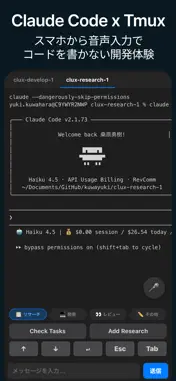
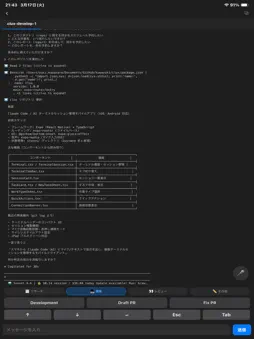
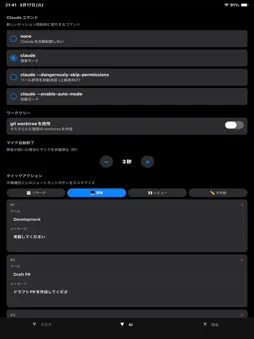
Tell AI to write code — from your bed. clux is a remote SSH terminal app for controlling AI coding tools (like Claude Code) on your PC from your iPhone or iPad. Connect to Mac, Windows, or Linux via SSH and operate in real time through tmux sessions. VIBE CODING, FROM ANYWHERE In the age of AI coding, you don't need to sit at your desk to build software. With clux, you can give AI instructions from your bed, your couch, or on the train — just by speaking. Send commands directly to Claude Code or any terminal-based AI coding tool running on your PC, see results in real time, and give the next instruction. Development never stops, even when you're away from your computer. KEY FEATURES Remote AI Coding Control Claude Code, GitHub Copilot CLI, Cursor, and other terminal-based AI coding tools from your iPhone or iPad. Send instructions, review output, and follow up — all from your mobile device. Voice-Powered Commands Give AI instructions using your voice instead of a keyboard. "Create a PR", "Run the tests" — just speak and the command is sent. Perfect for vibe coding while lying in bed. tmux Session Management Run multiple AI tasks in parallel. Organize sessions by work type — Research, Development, Review — and switch between them with a single tap. Let AI handle multiple jobs at once. ANSI Color Terminal Full 16-color ANSI support. See Claude Code's colorful output exactly as it appears on your desktop, providing a terminal experience comparable to your PC. Automatic Git Worktree Automatically create a Git worktree for each task. AI can develop multiple features in parallel, each in its own isolated branch. Customizable Quick Actions Send common AI instructions like "Implement this", "Create a PR", or "Review this" with one tap. Fully customizable per work type. PERFECT FOR - Letting AI write code while you relax in bed - Checking AI-generated PRs during your commute - Monitoring AI build progress from the couch - Managing multiple AI tasks while you're out SETUP (3 STEPS) 1. Enable SSH on your PC (Mac: Remote Login, Windows: OpenSSH Server) 2. Enter your PC's address and login credentials in clux 3. Test the connection and you're done An in-app setup guide walks you through every step. PRIVACY AND SECURITY - SSH credentials are encrypted and stored on-device - No communication with external servers - All operations stay within your local network With clux, AI coding is always at your fingertips.
Technical Analysis
Package Overview Basic metadata
Bundle ID
com.kuwayuki.clux Current Version 1.0
Minimum iOS 15.1
Package Size App Store Size
Package Metadata 1 / 1 version records
Detailed binary, privacy manifest, framework, and Info.plist results have not been indexed for this package yet. The verified App Store and archive metadata above remains available.
Developer Information
Known Version Records
1 version record with stored package metadata
Stored metadata does not guarantee a package is currently available to download.
| Details | Version / IDs | Version date | Action |
|---|---|---|---|
| 31.85 MB | v1.0 App Store ID: 883291403Build: 1.0 | 2026-03-18 06:42:21 | Get Version |